Visualizing Qualitative Data: Pie Charts and Relative Frequency Bar Charts
Learn how to construct and interpret pie charts and relative frequency bar charts for visualizing categorical data. Understand when to use each chart type to effectively represent proportions and compare categories.
When we collect data, we often encounter "qualitative" or "categorical" variables. Unlike quantitative data, which consists of numbers you can add or average (like height or temperature), qualitative data describes qualities or categories (like eye color, favorite fruit, or car brands). Because you cannot calculate a "mean" for a list of colors, we rely on different visualization techniques to understand how these categories are distributed.
In this article, we will explore the two most common ways to represent categorical data: the pie chart and the relative frequency bar chart. We will look at how to construct them, how to interpret them, and when to use one over the other.
Understanding Categorical Data
Before diving into the charts, it is essential to understand what we are measuring. Categorical data places observations into distinct groups. For example, if you survey a class about their preferred method of transportation, your categories might be "Bus," "Car," "Bicycle," or "Walking."
To make sense of this data, we often look at the frequency (the raw count of how many people chose a category) and the relative frequency (the proportion or percentage of the total that each category represents).
Exam Tip: Always check if a question is asking for "frequency" (counts) or "relative frequency" (percentages/proportions). Mixing these up is a common way to lose marks in statistics exams!
The Pie Chart: Visualizing Proportions
A pie chart is a circular graph divided into "slices" to illustrate numerical proportions. The entire circle represents the whole dataset (100%), and the size of each slice is proportional to the quantity it represents.
To create a pie chart, you must convert your frequencies into proportions or percentages. If you are drawing the chart by hand, you also need to calculate the central angle for each slice in degrees. The formula for the central angle is:
Angle=(Total FrequencyFrequency of Category)⋅360∘
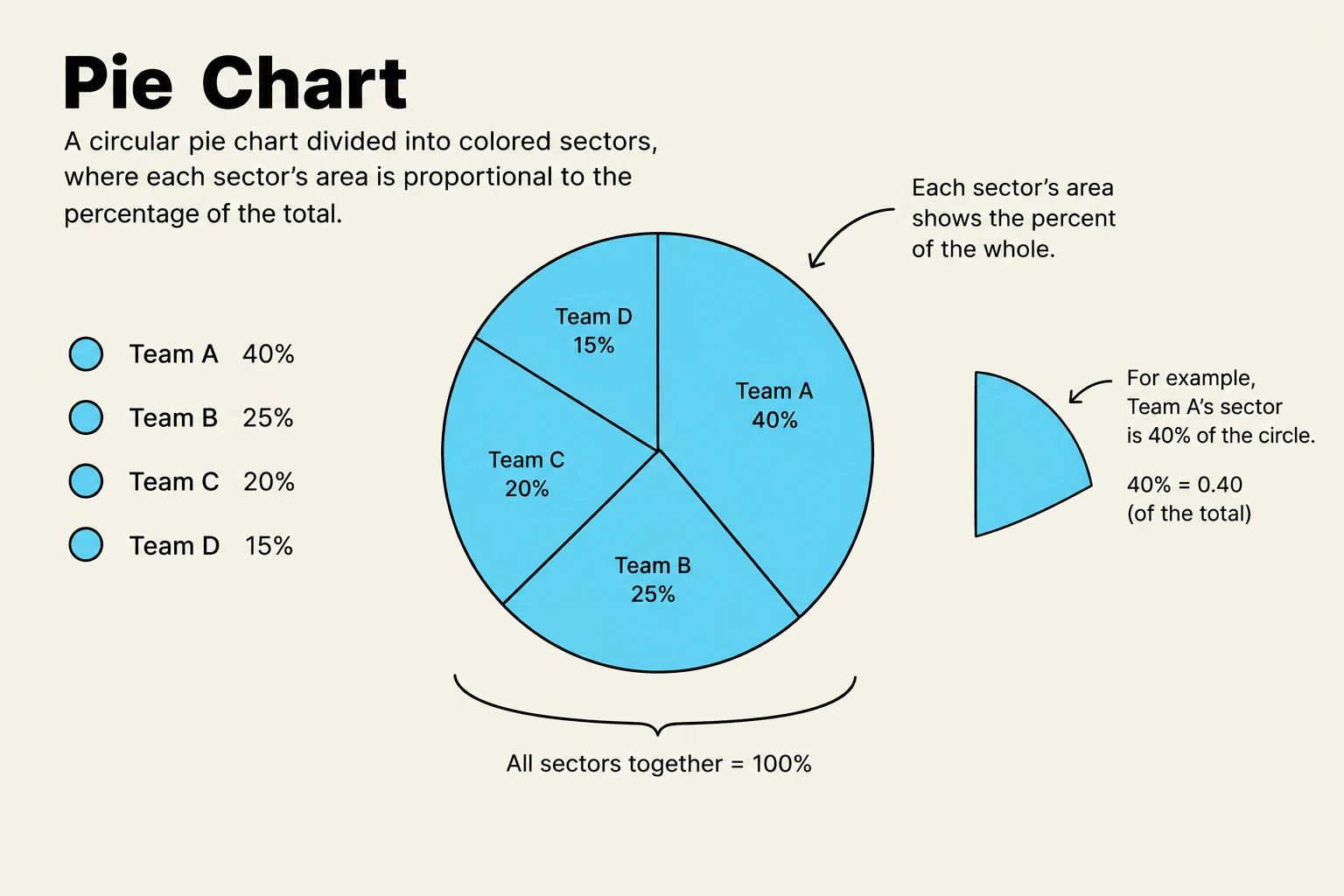
A pie chart is a circular graph divided into sectors, where each sector's size represents a proportion of the whole. The example shows how Team A's 40% share is depicted as a sector of the circle.
When to use a Pie Chart
Pie charts are excellent for showing "part-to-whole" relationships. They allow a viewer to see at a glance if one category dominates the entire dataset. However, they become difficult to read if there are too many categories, as the slices become too thin to distinguish.
Relative Frequency Bar Charts: Comparing Categories
While pie charts focus on how parts make up a whole, bar charts are designed to compare individual categories against one another. In a standard bar chart, the x-axis represents the different categories, and the y-axis represents the frequency.
A relative frequency bar chart is a variation where the y-axis does not show the raw counts, but rather the proportion or percentage of the total. This is particularly useful when comparing two different datasets of different sizes.
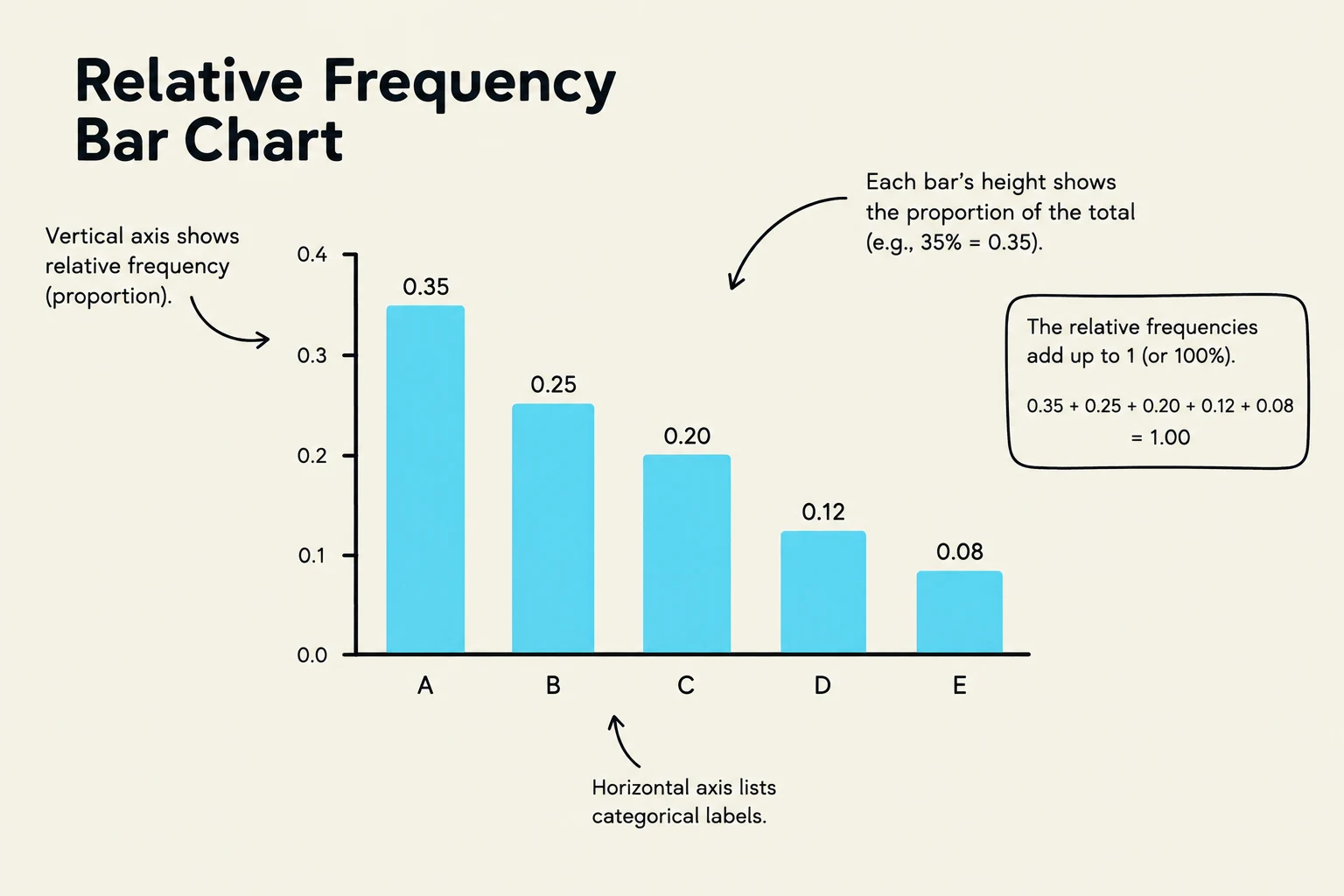
A relative frequency bar chart illustrating proportions for categorical labels A through E, with the sum of relative frequencies equaling 1.
Constructing a Relative Frequency Bar Chart
To build one, follow these steps:
Count the frequency of each category.
Calculate the total number of observations (n).
Divide each category's frequency by n to find the relative frequency:
Relative Frequency=Total CountFrequency
Plot the categories on the x-axis and the relative frequencies on the y-axis.
Note on Bar Charts: Unlike histograms (which are used for continuous numerical data), the bars in a categorical bar chart should not touch. The gaps between the bars signify that the categories are discrete and separate.
Worked Example: Surveying Pet Ownership
Let's put these concepts into practice. Suppose we survey 20 people about their favorite type of pet. The results are:
Dog: 10
Cat: 6
Fish: 4
Step 1: Calculate Relative Frequencies
The total number of responses is n=20.
Dog:2010=0.50 (or 50%)
Cat:206=0.30 (or 30%)
Fish:204=0.20 (or 20%)
Step 2: Creating the Visuals
For a Pie Chart:
We calculate the angles:
Dog: 0.50⋅360∘=180∘
Cat: 0.30⋅360∘=108∘
Fish: 0.20⋅360∘=72∘
For a Relative Frequency Bar Chart:
We would draw three bars. The "Dog" bar would rise to the 0.5 mark on the y-axis, the "Cat" bar to 0.3, and the "Fish" bar to 0.2.
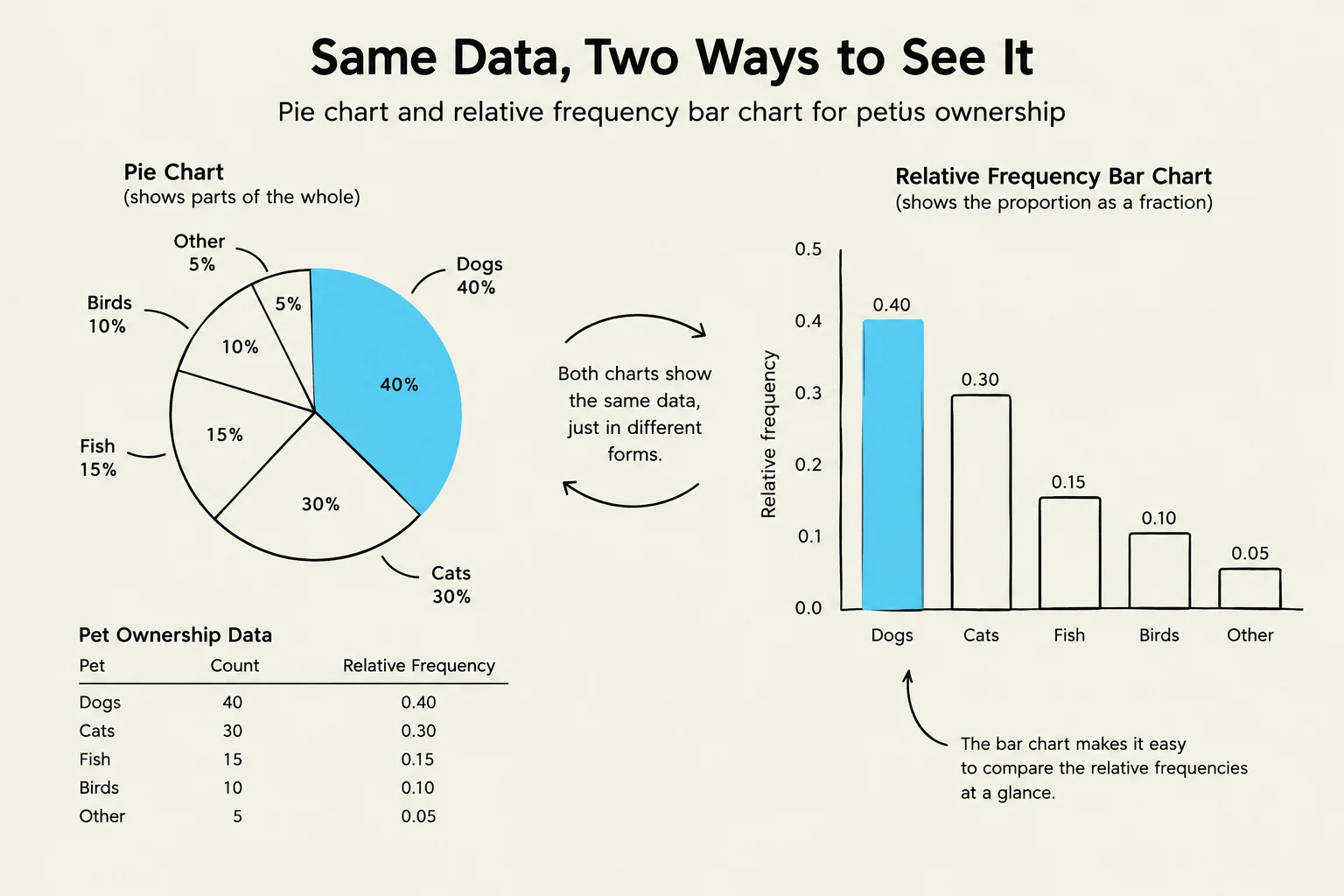
This illustration compares a pie chart and a relative frequency bar chart, both representing the same pet ownership data. The pie chart shows parts of a whole, while the bar chart illustrates proportions as fractions, making it easy to compare relative frequencies at a glance.
Summary Comparison
Feature
Pie Chart
Relative Frequency Bar Chart
Primary Goal
Show part-to-whole relationships.
Compare individual categories.
Best Use Case
Few categories; showing dominance.
Many categories; precise comparisons.
Y-Axis/Scale
Angles in degrees (or area).
Proportions or Percentages.
Limitation
Hard to compare similar-sized slices.
Does not visually "close" the circle to show 100%.
By choosing the right chart, you ensure that your data tells a clear and accurate story. Use pie charts when the "big picture" of the whole is most important, and use relative frequency bar charts when you want to highlight the specific differences between groups.
Keep reading for free.
Create an account to finish this reading and make it part of your study routine.