Understanding Program Memory: Text, Data, Heap, and Stack
Explore the fundamental memory sections of a running program: Text (code), Data (global/static variables), Heap (dynamic allocation), and Stack (function calls/local variables). Learn how these sections interact and contribute to memory management.
When you write a program in a language like C++, Java, or Python, you aren't just writing lines of text; you are creating a set of instructions that must be translated into a format the computer's hardware can understand. Once that program is compiled and begins to run, the operating system allocates a specific block of memory to it. This memory is not just one big, undifferentiated bucket of bits. Instead, it is organized into distinct sections, each with a specific role in managing how the CPU executes code and how data is stored and retrieved.
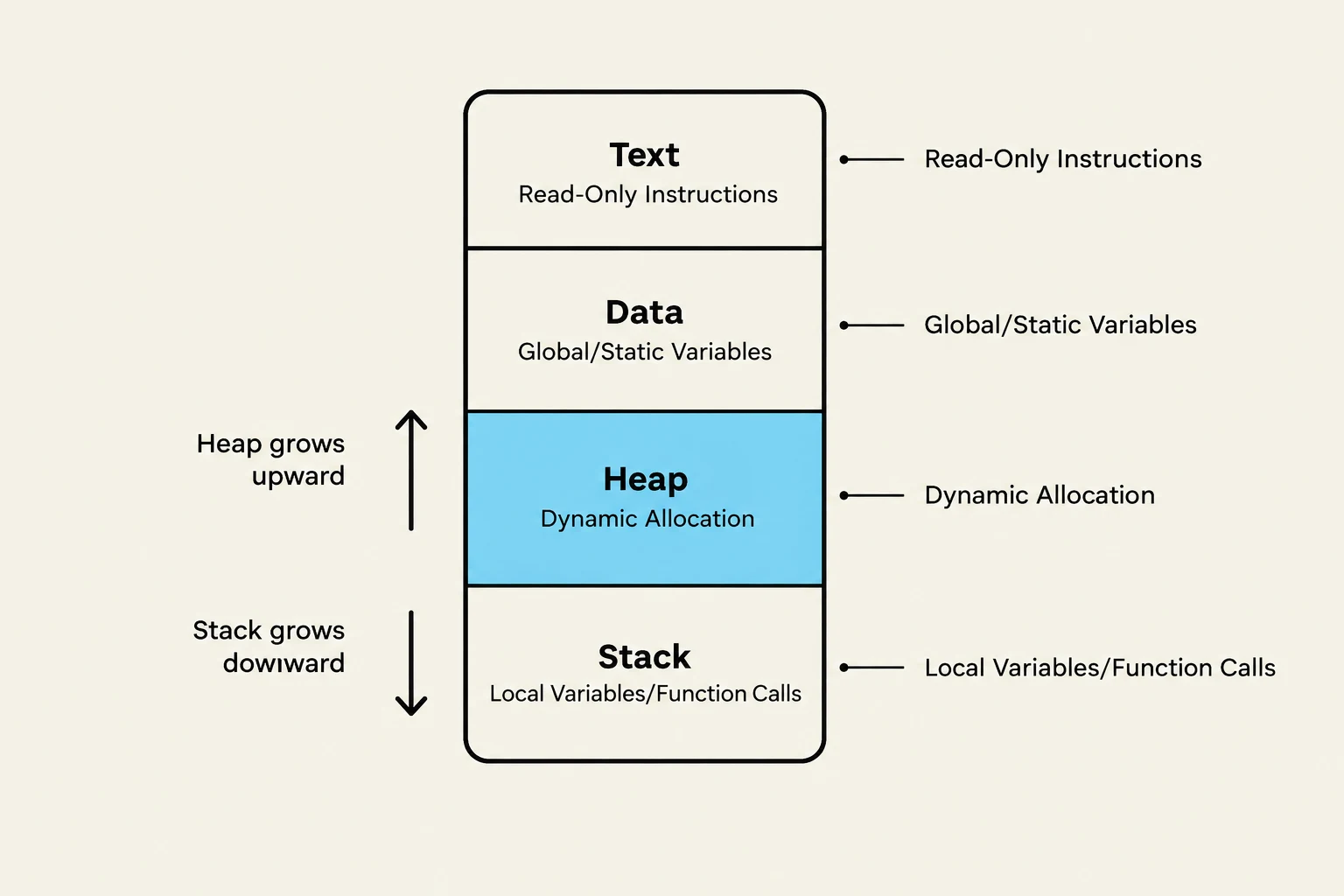
This diagram illustrates the memory layout of a program, showing the Text, Data, Heap, and Stack segments and how they grow.
Understanding these sections—the Text, Data, Heap, and Stack—is fundamental to understanding how software interacts with hardware and how memory management errors (like memory leaks or stack overflows) occur.
The Text Section: The Program's Blueprint
The Text Section (sometimes called the Code Segment) is the part of memory that contains the actual machine instructions. When you compile your code, the compiler translates your high-level logic into binary instructions that tell the CPU exactly what operations to perform.
A defining characteristic of the text section is that it is typically read-only. This is a crucial security and stability feature. If a program were allowed to write to its own text section, it could accidentally (or maliciously) modify its own logic while running, leading to unpredictable behavior or security vulnerabilities. By marking this area as read-only, the operating system ensures that the "instructions" remain constant throughout the execution of the process.
The Data Section: Long-Term Storage
While the text section holds the logic, the Data Section holds the state of the program that needs to persist for a long time. Specifically, this section is used for variables that are initialized and intended to exist for the entire lifetime of the program.
This section primarily houses two types of variables:
Global Variables: Variables declared outside of any specific function that can be accessed from anywhere in the program.
Static Variables: Variables that are declared with a static keyword, meaning they retain their value even after the function they were defined in has finished executing.
Key Distinction: Global vs. Local
A global variable is like a public bulletin board in a city; anyone can see it and use it at any time. A local variable, however, is like a private note in your pocket; it only exists for as long as you are performing a specific task (a function call) and is hidden from the rest of the world.
The Heap: Dynamic Flexibility
In many programming scenarios, you don't know exactly how much memory you will need until the program is actually running. For example, if you are writing a program to manage a list of users, you won't know if there will be 5 users or 5,000 users until the program starts receiving data.
This is where the Heap comes in. The heap is used for dynamic memory allocation. Unlike the data section, which is largely determined at compile time (when the code is being built), the heap is managed during runtime (when the program is actually executing).
The size and management of the heap are highly flexible. You can request more memory as needed, but you must also be careful to manage it properly to avoid wasting resources.
The Stack: Short-Term Execution
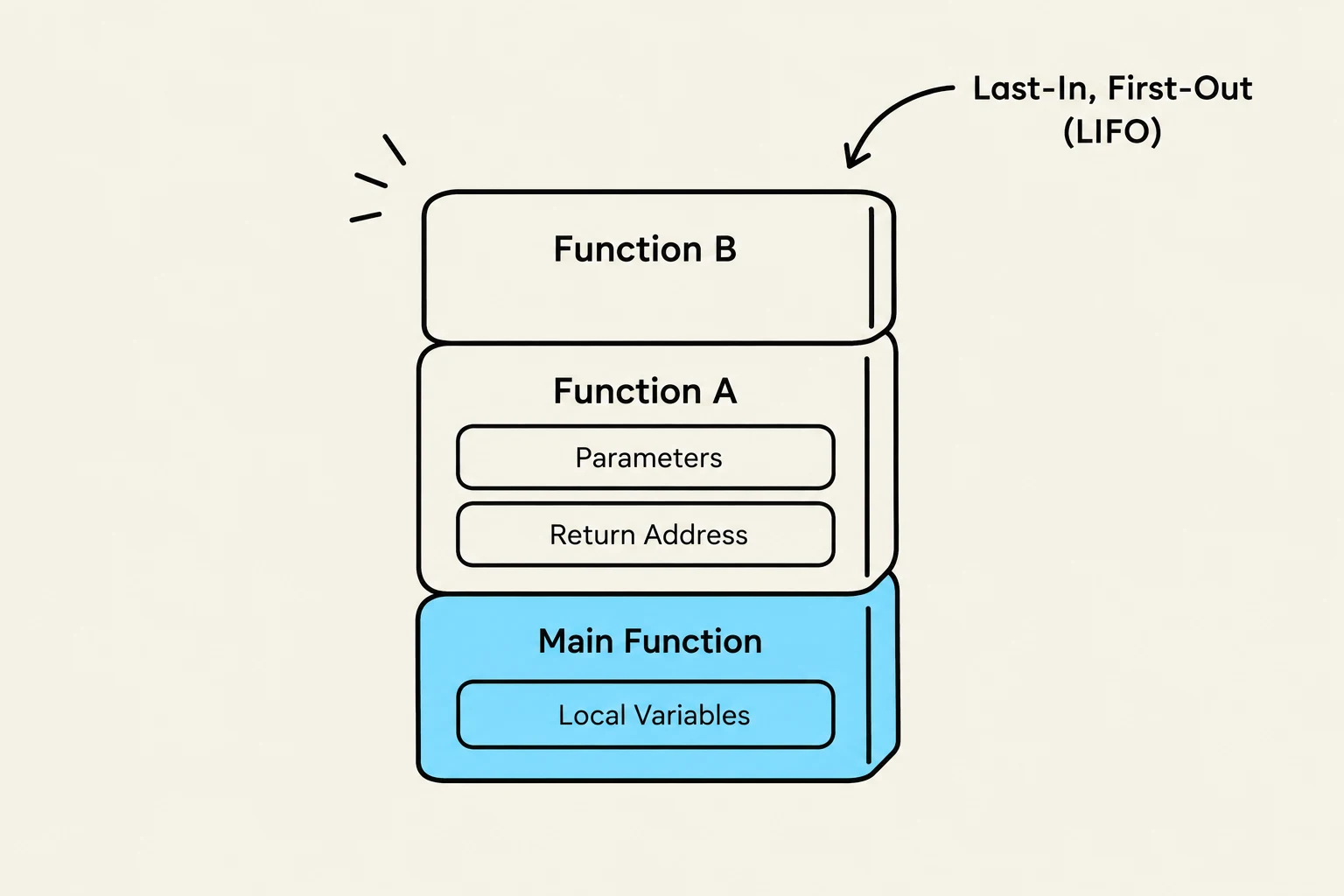
This diagram illustrates the Last-In, First-Out (LIFO) principle, often represented by a call stack in computer programming. It shows how functions are added and removed from the stack, with the most recently added function being the first to be removed.
The Stack is a highly organized, fast-moving area of memory used for temporary data storage related to function calls. Whenever a function is "invoked" or called, the computer needs to keep track of several things to ensure it can return to where it left off once the function is done.
The stack manages:
Local Variables: Variables declared inside a function that only exist while that function is running.
Function Parameters: The input values passed into a function.
Return Addresses: The "bookmark" that tells the CPU which line of code to go back to after the current function finishes.
Because the stack follows a "Last-In, First-Out" (LIFO) structure, it is incredibly efficient for managing the nested nature of function calls (where Function A calls Function B, which then calls Function C).
Summary Comparison
To visualize how these sections work together, consider the following table:
Section
Purpose
Variable Type
Lifetime
Text
Machine Instructions
N/A (Code)
Entire Execution
Data
Long-term state
Global / Static
Entire Execution
Heap
Dynamic flexibility
Dynamically allocated
Controlled by programmer/runtime
Stack
Function management
Local / Parameters
Duration of function call
Understanding Compile Time vs. Runtime
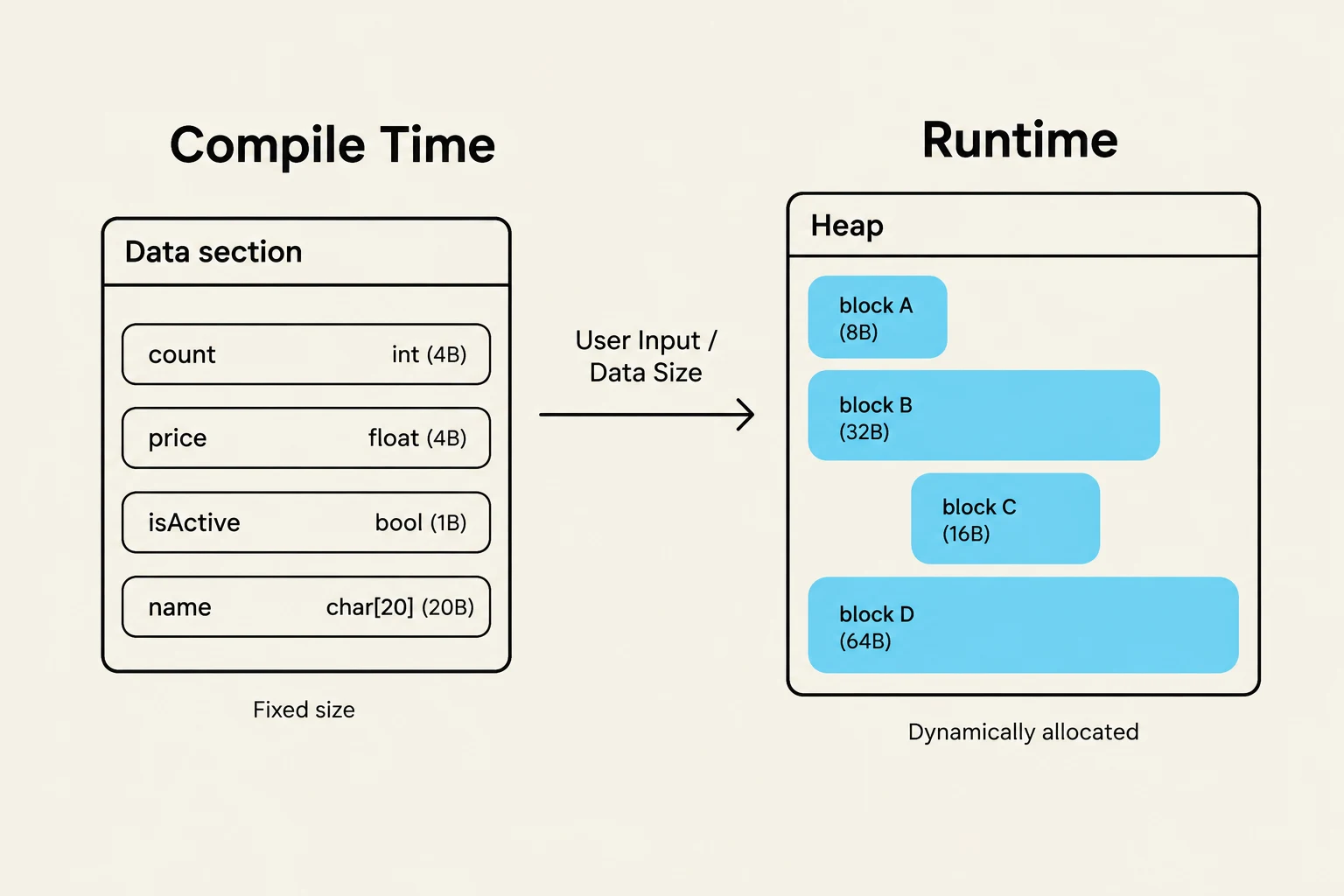
This diagram illustrates the difference between compile-time fixed-size data allocation and runtime dynamic allocation on the heap, showing how user input or data size influences the latter.
A common point of confusion for students is the difference between static and dynamic memory needs.
Compile Time: This is the phase where your source code is translated into machine code. If the size of a variable is fixed and known during this phase, it is often handled via static allocation (like in the Data section).
Runtime: This is when the program is actually running on the user's computer. If the program needs to decide how much memory to use based on user input or a file size, it uses dynamic allocation (the Heap).
Exam Tip
If a question asks where local variables are stored, the answer is almost always the Stack. If it asks where global variables are stored, look for the Data section. If it mentions dynamic allocation or memory needed at runtime, think Heap.
By understanding these four distinct regions, you gain a much clearer picture of how a program breathes life into your code, moving from static instructions to a dynamic, living process.
Keep reading for free.
Create an account to finish this reading and make it part of your study routine.