Understanding Malware: Types, Characteristics, and Prevention
This guide provides a comprehensive overview of various malware types, including viruses, worms, Trojans, rootkits, and ransomware. It details their unique methods of infection, propagation, and payload delivery, along with a summary table for easy comparison. The content emphasizes the importance of a layered defense
In the modern digital landscape, the term "malware"—short for malicious software—serves as an umbrella term for any code designed to infiltrate, damage, or gain unauthorized access to a computer system. Understanding the nuances between different types of malware is not just a task for cybersecurity professionals; it is a fundamental requirement for anyone looking to navigate the digital world safely. Malware is not a monolithic threat; rather, it is a diverse ecosystem of tools, each with unique methods of infection, propagation, and payload delivery.
The Self-Replicating Threats: Viruses and Worms
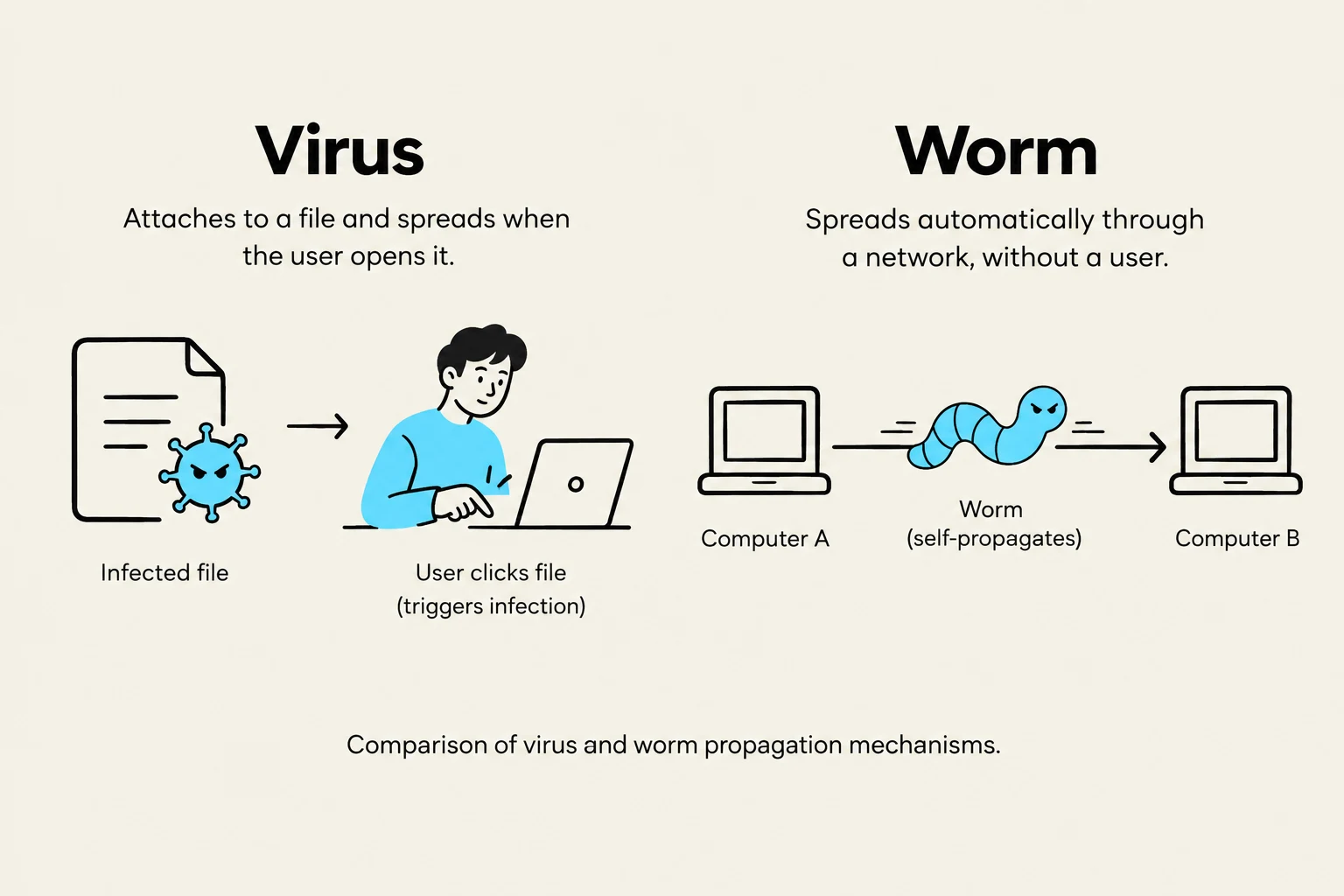
Comparison of virus and worm propagation mechanisms.
One of the most common misconceptions in cybersecurity is the interchangeable use of the terms "virus" and "worm." While both are designed to spread, their mechanisms of action are fundamentally different.
Viruses
A computer virus is a piece of malicious code that attaches itself to a legitimate program or file. Much like a biological virus requires a host cell to replicate, a computer virus requires human intervention to spread. For example, if a virus is attached to an .exe file, the infection only occurs when a user manually executes that file. Once triggered, the virus can corrupt data, delete files, or alter system settings.
Worms
Worms are significantly more dangerous in terms of speed and autonomy. Unlike a virus, a worm does not need to attach itself to an existing program, nor does it require human interaction to spread. Instead, worms exploit vulnerabilities in network protocols to move from one computer to another automatically.
Exam Tip: If a question asks about a threat that spreads across a network without any user action, the answer is almost certainly a Worm.
Deception and Stealth: Trojans and Rootkits
This diagram illustrates how a rootkit, a type of malicious software, operates within a computer's operating system and kernel to intercept system calls and hide its presence, potentially providing false information to user applications.
While viruses and worms focus on replication, other forms of malware focus on deception and maintaining a long-term presence within a system.
Trojans (Trojan Horses)
Named after the ancient Greek myth, a Trojan is a type of malware that disguises itself as legitimate, useful software. A user might download what appears to be a free media player or a helpful system utility, only to find that the software has opened a "backdoor" for attackers. Once installed, Trojans can steal sensitive data, monitor user activity, or provide remote access to a hacker.
Rootkits
Rootkits are among the most difficult types of malware to detect. Their primary goal is to hide the presence of other malware or unauthorized access from the operating system and security software. By embedding themselves deep within the system—often at the kernel level (the core of the OS)—rootkits can intercept system calls. This allows them to report that "everything is normal" even while malicious processes are running in the background.
Financial Extortion: Ransomware
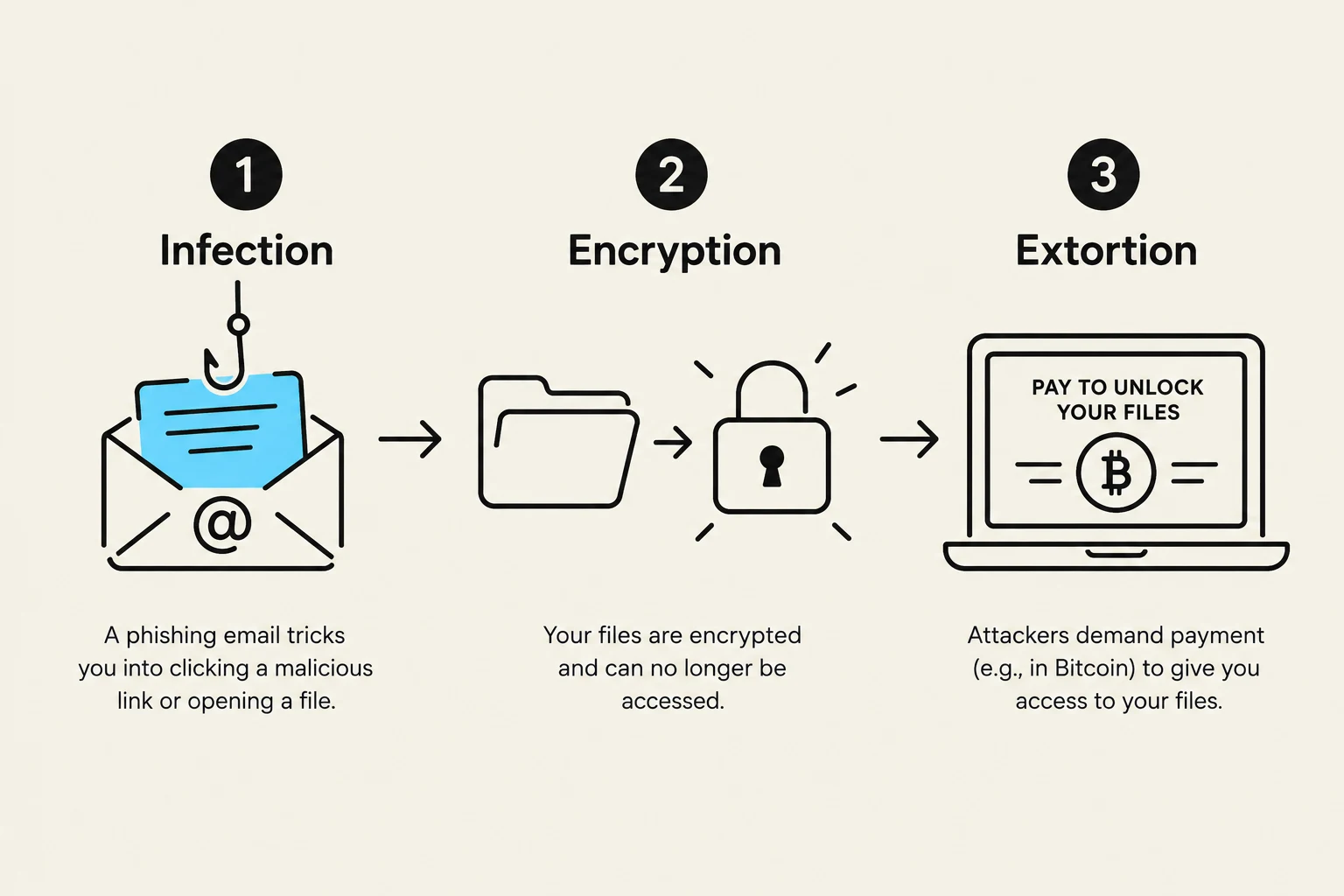
This diagram illustrates the three stages of a ransomware attack: infection via a phishing email, encryption of files, and extortion for payment to unlock them.
In recent years, ransomware has become one of the most high-profile and economically damaging forms of malware. Ransomware typically follows a specific lifecycle:
Infection: Often via phishing emails or exploited vulnerabilities.
Encryption: The malware identifies critical files (documents, photos, databases) and uses strong encryption to lock them.
Extortion: A notification is displayed on the user's screen demanding payment (usually in cryptocurrency like Bitcoin) in exchange for the decryption key.
Modern "double extortion" tactics involve the attacker not only encrypting the files but also stealing them, threatening to leak sensitive data publicly if the ransom is not paid.
Summary Table of Malware Characteristics
To help consolidate your learning, refer to the following comparison of the primary malware types discussed:
Malware Type
Requires Host File?
Self-Replicating?
Primary Characteristic
Virus
Yes
Yes (with user action)
Attaches to legitimate files.
Worm
No
Yes (autonomous)
Exploits network vulnerabilities.
Trojan
No
No
Disguises itself as legitimate software.
Rootkit
No
No
Hides itself and other malware.
Ransomware
No
Varies
Encrypts data for financial gain.
Conclusion
Malware is constantly evolving. As security software becomes better at detecting traditional viruses, attackers shift toward more sophisticated methods like rootkits for stealth or ransomware for immediate financial impact. A layered defense strategy—combining updated software, network monitoring, and user education—remains the best way to mitigate these diverse threats.
Keep reading for free.
Create an account to finish this reading and make it part of your study routine.