Understanding Geospatial Data Formats and Organization
This lesson covers how Geographic Information Systems (GIS) organize data into physical data structures using standardized formats like binary and ASCII text. It explains logical data models such as vector and raster, and practical implementations like shapefiles and georeferencing, emphasizing the importance of topolo
In Geographic Information Systems (GIS), maps are more than just pictures; they are mathematical representations of the real world stored in a computer's memory. To make these representations useful, GIS must organize data into specific physical data structures, such as files and directories, using standardized formats that allow computers to process spatial information efficiently.
Physical Data Storage: Binary vs. ASCII
When we save geospatial data to a disk, we generally use one of two formats: binary or ASCII text.
ASCII (American Standard Code for Information Interchange) is a text-based format. Because it uses standard characters, it is "human-readable," meaning you could open an ASCII file in a simple text editor like Notepad and read the values.
Binary files, on the other hand, are "computer-readable" but not human-readable. They store data as a series of bits (0s and 1s) that are optimized for speed and storage efficiency. While a human might see a jumble of strange symbols when opening a binary file, a computer can process these bits much faster than it can parse text.
Pro Tip: While ASCII is great for debugging and human inspection, binary formats are almost always preferred for large-scale spatial datasets because they take up less space and allow for much faster reading and writing operations.
Standardized Text and Binary Representations
To ensure that different GIS software packages can talk to one another, the industry uses standardized ways to represent geometry. Two of the most important standards are Well-Known Text (WKT) and Well-Known Binary (WKB).
Well-Known Text (WKT)
WKT is a text markup language used to represent vector geometry objects, spatial reference systems, and transformations. It uses clear, descriptive labels to define shapes. For example:
POINT(0 0)
LINESTRING(0 0, 1 1, 1 2)
POLYGON((0 0, 4 0, 4 4, 0 4, 0 0))
Well-Known Binary (WKB)
Because WKT is text-based, it can be slow to process in large databases. To solve this, Well-Known Binary (WKB) serves as the binary equivalent. It stores the exact same geometric information as WKT but in a compact, machine-optimized format, making it ideal for transferring and storing data within spatial databases.
This diagram illustrates the conversion between Well-Known Text (WKT) and Well-Known Binary (WKB) formats for representing geometric data. WKT is human-readable, while WKB is a compact, non-human-readable binary byte stream.
Logical Data Models: Vector vs. Raster
While binary and ASCII describe how the data is written to a file, the logical data model describes how the geographic features are organized conceptually. GIS traditionally uses two primary models: Vector and Raster.
The Vector Data Model
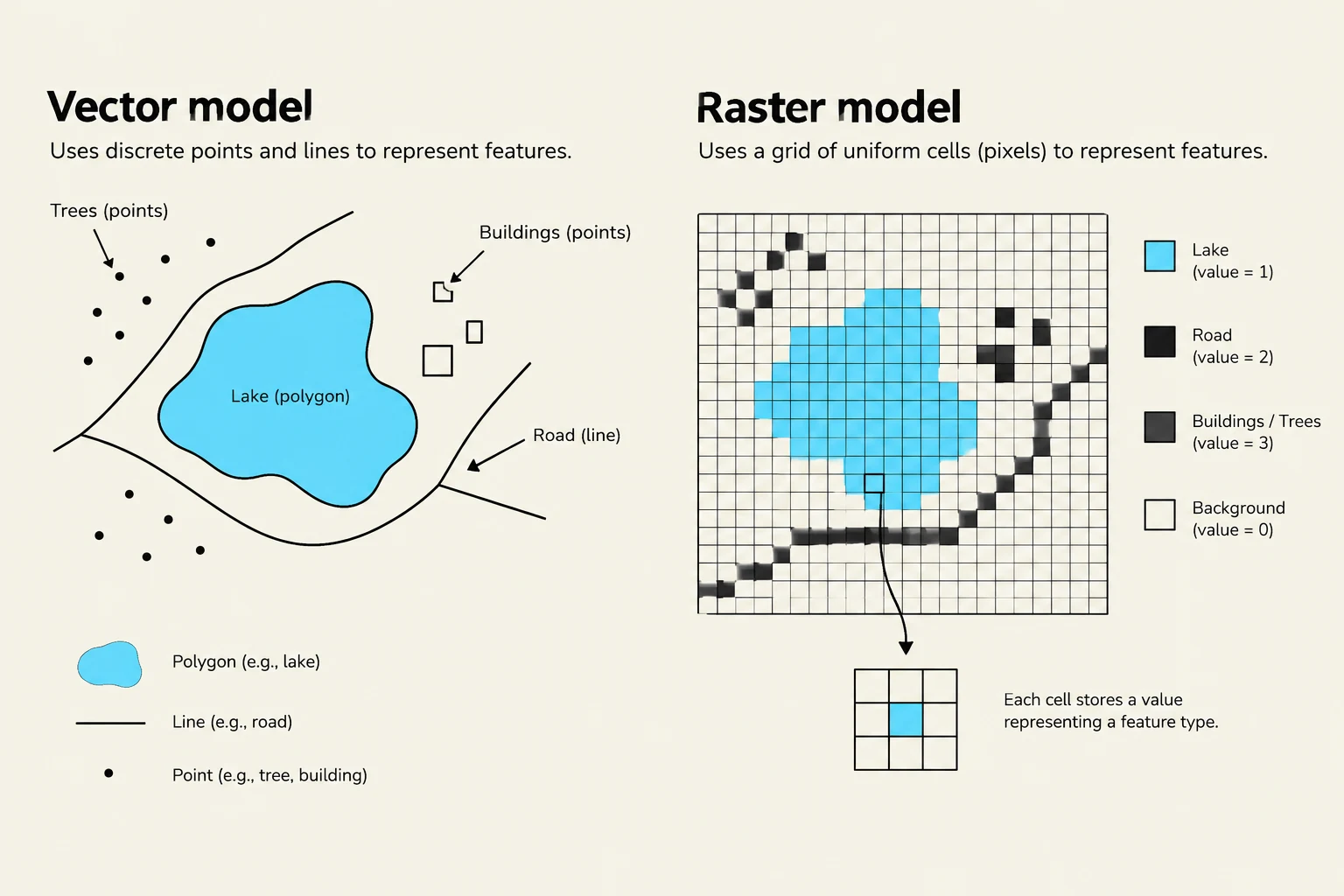
The vector model represents the world using discrete points, lines, and polygons.
Points represent specific coordinates.
Lines are composed of connected points.
Polygons (areas) are made of lines that close a loop.
This model is ideal for features with well-defined boundaries, such as buildings, roads, or administrative borders.
The Raster Data Model
The raster model (often called a "grid") represents the world as a continuous surface divided into a matrix of cells or pixels. Each cell contains a value representing a specific characteristic, such as temperature, elevation, or spectral reflectance.
Raster data is best suited for continuous phenomena that change gradually across space, such as sea surface temperature or satellite imagery.
This illustration compares the vector and raster models for representing geographic features. The vector model uses discrete points, lines, and polygons, while the raster model uses a grid of uniform cells (pixels) to represent features, with each cell storing a value indicating the feature type.
Practical Implementations: Shapefiles and Georeferencing
ArcGIS Shapefiles
One of the most common vector formats is the ArcGIS Shapefile. A "shapefile" is actually a collection of several files that must stay together to function correctly:
.shp: Stores the actual vector-based geometric information.
.shx: An index file that helps the software quickly locate specific geometries.
.dbf: A dBASE table that stores the attribute information (the "data" behind the shapes).
.prj: Contains the Coordinate Reference System (CRS) information, which tells the GIS where on Earth the data is located.
The Importance of Georeferencing
For a raster file to be useful in a GIS, it must be "georeferenced". While many standard image formats (like JPEG or GIF) can store visual information, they lack the "header" information required to tie the geometry back to real-world geography. Formats like GeoTIFF or ASCII Grid include this critical spatial metadata.
Topology and Data Integrity
In vector datasets, it is not enough to just have coordinates; we also need to understand how features relate to one another. This is known as topology.
Topology defines the spatial relationships between features, such as which polygons share a common boundary or which lines connect at a specific node. Maintaining correct topology is vital because:
Efficiency: It allows GIS operations (like "dissolving" boundaries) to be performed without constantly recalculating every single point.
Accuracy: Incorrect topology can lead to "data analysis nightmares," resulting in incorrect calculations for area, perimeter, or attribute totals.
This illustration explains topological relationships between polygons, defining concepts like shared boundaries, adjacency, and connectivity with visual examples and a graph.
Summary: Choosing the Right Model
Deciding whether to use vector or raster depends entirely on your research question:
Feature Type
Recommended Model
Example
Discrete/Defined Boundaries
Vector
Buildings, roads, property lines
Continuous Surfaces
Raster
Temperature, elevation, canopy cover
Understanding these underlying structures—from the bits in a binary file to the topological rules of a polygon—is the foundation of all advanced geospatial analysis.
Keep reading for free.
Create an account to finish this reading and make it part of your study routine.