This guide explains the four-stage process of Computed Radiography (CR) imaging, including exposing, stimulating, reading, and erasing the photostimulable phosphor plate. It covers signal translation from analog to digital, image quality factors like signal-to-noise ratio, and the importance of Exposure Indicators (EI)
Computed Radiography (CR) represents a bridge between traditional film-based imaging and fully digital systems. Unlike direct digital radiography (DR), which uses electronic sensors, CR relies on a reusable imaging plate to capture radiation. Understanding the physics of how a signal is created, read, and converted is essential for any radiologic technologist aiming to optimize image quality and patient safety.
The CR process is a continuous four-stage cycle: Expose, Stimulate, Read, and Erase.
The Four-Stage Imaging Cycle
1. Expose: Creating the Latent Image
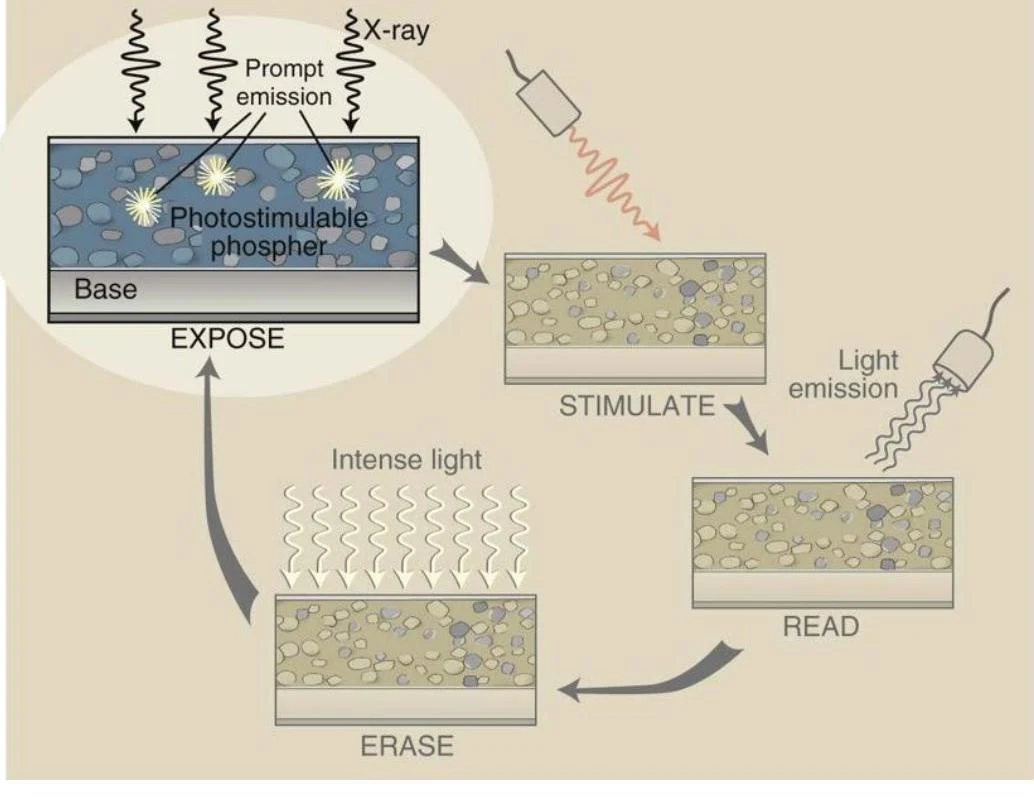
The process begins when a cassette containing a Photostimulable Phosphor (PSP) plate is exposed to X-ray radiation. When X-ray photons strike the phosphor crystals, they transfer energy to electrons within the material. These electrons are excited to a higher energy state.
While most electrons immediately return to their ground state, some become trapped in "holes" or metastable states within the crystal lattice. This collection of trapped electrons represents the latent image—an invisible image that exists as stored energy on the plate.
Diagram illustrating the process of photostimulable phosphors used in imaging, involving exposure, stimulation, reading, and erasing steps.
2. Stimulate: Releasing the Energy
To retrieve the stored information, the PSP plate must be placed into a CR Reader. Inside the reader, the plate undergoes translation, which is the physical movement of the imaging plate through the reader mechanism.
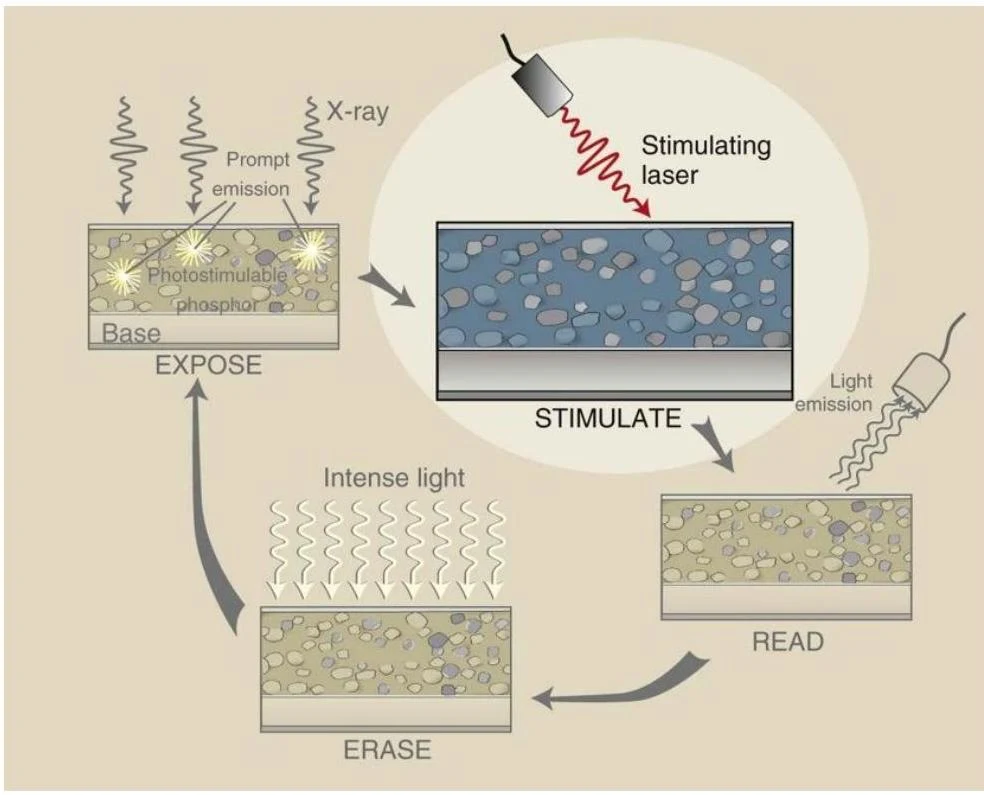
As the plate moves, it is scanned by a red laser beam (approximately 100μm wide). Special optics ensure the laser beam maintains a consistent size, shape, and speed regardless of its position on the plate. The laser provides the energy necessary to "shake" the trapped electrons loose from their holes.
Diagram illustrating the process of photostimulable phosphor imaging, involving exposure to X-rays, stimulation by a laser, reading of emitted light, and erasure.
3. Read: Converting Light to Electricity
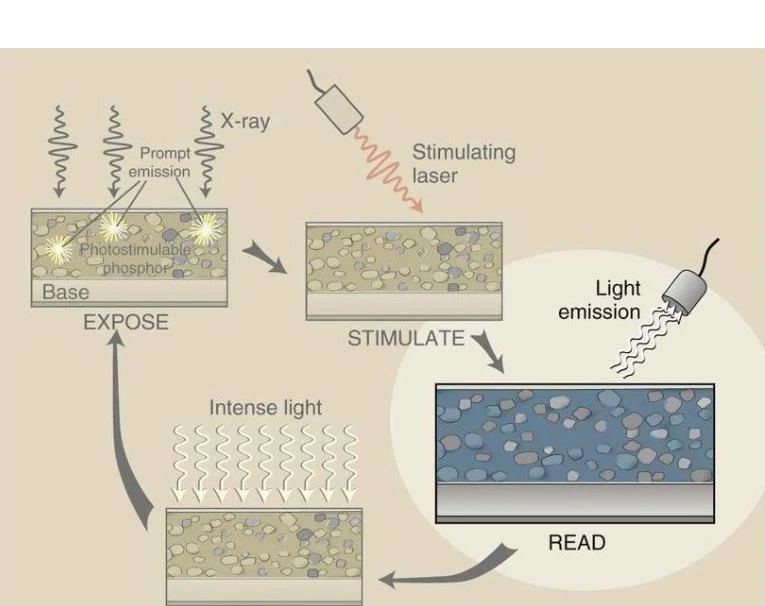
As the freed electrons fall back to their lower energy ground state, they emit light, specifically in the blue/green spectrum. This emitted light is the physical manifestation of the latent image.
To capture this light, the reader uses an optical filter to ensure that only the relevant blue/green light reaches the detector, blocking out the stimulating red laser light. This light is then collected by a photomultiplier tube (PMT), which converts the light photons into an electrical analog signal.
Diagram illustrating the process of photostimulable phosphor imaging, involving exposure to X-rays, stimulation by a laser, and light emission for reading.
4. Erase: Resetting the Plate
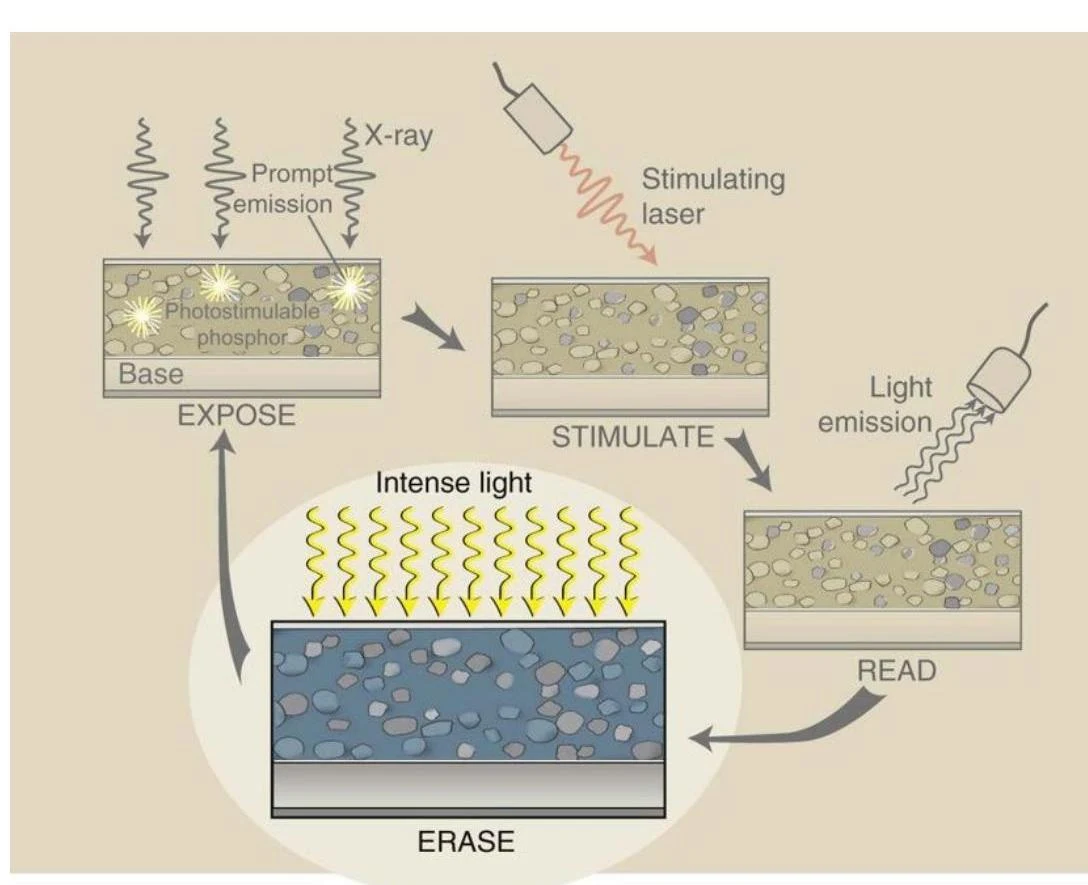
After the reading process is complete, most electrons have returned to their ground state, but some may remain trapped. Because CR plates are highly sensitive to background radiation, they must be thoroughly cleaned to prevent "fog" or scatter on future exams.
The erase cycle involves flooding the PSP with intense, bright white light, which forces all remaining metastable electrons back to their ground state, effectively clearing the plate for its next use.
Diagram illustrating the process of photostimulable phosphor imaging, involving exposure to X-rays, stimulation with a laser, light emission for reading, and erasure with intense light.
Signal Translation: From Analog to Digital
The electrical signal produced by the PMT is an analog signal, meaning it is a continuous wave of varying voltage. However, computers cannot process continuous waves; they require discrete numbers.
Analog-to-Digital Converter (ADC): The analog signal is sent to the ADC, which converts the electrical fluctuations into digital data (binary numbers).
Digital Processing: The computer manipulates this digital data to adjust brightness, contrast, and sharpness.
Digital-to-Analog Converter (DAC): To view the image on a monitor, the digital data must be converted back into an analog signal that the monitor can display as light.
Image Quality and Exposure Indicators (EI)
In the digital era, image quality is less about "how dark" a film is and more about the signal-to-noise ratio. Digital receptors possess a wide exposure latitude, meaning they can often produce a usable image even if the dose is 1/2 or 2× the ideal amount. However, while the brightness might look correct, incorrect exposure will significantly impact image contrast and noise levels.
To prevent technologists from relying solely on visual inspection, manufacturers provide an Exposure Indicator (EI). The EI is a numerical value representing the amount of radiation that actually struck the image receptor.
Understanding Manufacturer-Specific EI Scales
One of the most common pitfalls for students is assuming all EI numbers work the same way. Some scales are directly proportional (higher number = more radiation), while others are inversely proportional (higher number = less radiation).
System
Indicator Type
Ideal Value
Acceptable Range
Relationship to Exposure
Fuji CR
Sensitivity (S)
200
100–400
Inversely Proportional
CareStream CR
Exposure Index (EI)
2000
1700–2300
Directly Proportional
Agfa CR
Log Median (LgM)
2.5
2.2–2.8
N/A
Phillips DR
Exposure Index (EI)
200*
100–300
Directly Proportional
Siemens DR
Exposure Index (EI)
1000
500–2000
Directly Proportional
*Note: For Phillips DR, the ideal for a chest exam is 450.
Exam Tip: The Fuji Trap
On a Fuji system, a high number is bad. If you see an S number of 500, the exposure was insufficient, and you will likely see quantum mottle (graininess) in the image. Conversely, on a CareStream system, a high number is good—it indicates a strong signal.
The Deviation Index (DI)
Modern DR equipment is moving toward a standardized way of communicating exposure called the Deviation Index (DI). The DI compares the actual exposure received ($EI_s$) to the target exposure ($EI_T$) that should have been received.
DI=Difference between EIs and EIT
On many systems, a DI of 0 is perfect.
Positive DI (>0): Indicates overexposure.
Negative DI (<0): Indicates underexposure.
Many systems use a "traffic light" indicator to help technologists quickly assess the DI:
Green (-3 to +3): Within range.
Yellow (-3 to -6 or +3 to +6): Warning of underexposure or overexposure.
Red (Less than -6 or greater than +6): Severe error; requires immediate adjustment of technique.
Limitations and Radiation Safety
While EIs and DIs are powerful tools, they are not infallible. A technologist cannot rely on these numbers alone to determine image quality. Several factors can "trick" the indicator, including:
Use of gonadal shielding or prostheses.
Poor collimation.
Including too much or too little anatomy.
Selecting the wrong menu on the reader.
To supplement exposure monitoring, many modern machines also provide the Dose Area Product (DAP). The DAP reflects the total amount of radiation striking the patient, accounting for both intensity and the size of the irradiated area, measured in mGy⋅cm2. As the field size increases, the DAP increases accordingly.
Keep reading for free.
Create an account to finish this reading and make it part of your study routine.