Python Flow Control, Functions, and Exception Handling
Learn about Python's flow of execution, including functions, conditional statements, loops, modules, and exception handling. This guide covers essential programming concepts for building robust applications.
When you write a computer program, you aren't just writing a list of instructions; you are designing a path for data to travel. By default, Python follows a very predictable pattern: it starts at the first line and moves downward, executing one statement at a time. However, real-world logic is rarely a straight line. To build complex software, you need to master "flow control"—the ability to skip certain lines, repeat others, or jump to entirely different parts of your code based on specific conditions.
The Flow of Execution
The "flow of execution" refers to the order in which individual statements are processed by the Python interpreter. While the default is top-to-bottom, we use specific tools to alter this path:
Functions: These allow the program to "jump" to a different location to execute a block of code and then return to where it left off.
Conditionals: These allow the program to choose whether or not to execute a specific block of code.
Loops: These allow the program to repeat a block of code multiple times.
This diagram illustrates the execution flow of a program, contrasting a default top-to-bottom path with one that includes a function call and return.
Functions and Recursion
Functions are reusable blocks of code designed to perform a specific task. A crucial rule to remember is that defining a function does not actually run the code inside it; the statements inside a function are only executed when the function is explicitly "called".
Recursion: Functions that Call Themselves
A more advanced concept is recursion, which occurs when a function calls itself. This is often used to solve mathematical problems like factorials. For example, to find the factorial of n ($n!$), you multiply n by the factorial of n−1:
n!5!=n⋅(n−1)!=5⋅4⋅3⋅2⋅1=120
In Python, a recursive function must include a "base case" (a condition to stop the recursion), otherwise, it will continue calling itself indefinitely.
Conditional Statements
Conditionals allow your program to make decisions. Using if, elif (else if), and else statements, you can direct the program to execute different code based on whether a Boolean expression evaluates to True or False.
You can use compound conditions with logical operators like and. For example:
if x > 10 and y * 4 < 30:.
Python also offers a convenient shorthand for checking if a value falls within a range. Instead of writing if x >= 0 and x <= 50:, you can simply write if 0 <= x <= 50:.
Exam Tip: Remember that in Python, any expression that yields a non-zero value is treated as True. For instance, if 2 * 3: will evaluate to True because the result is 6.
Loops: Iteration and Control
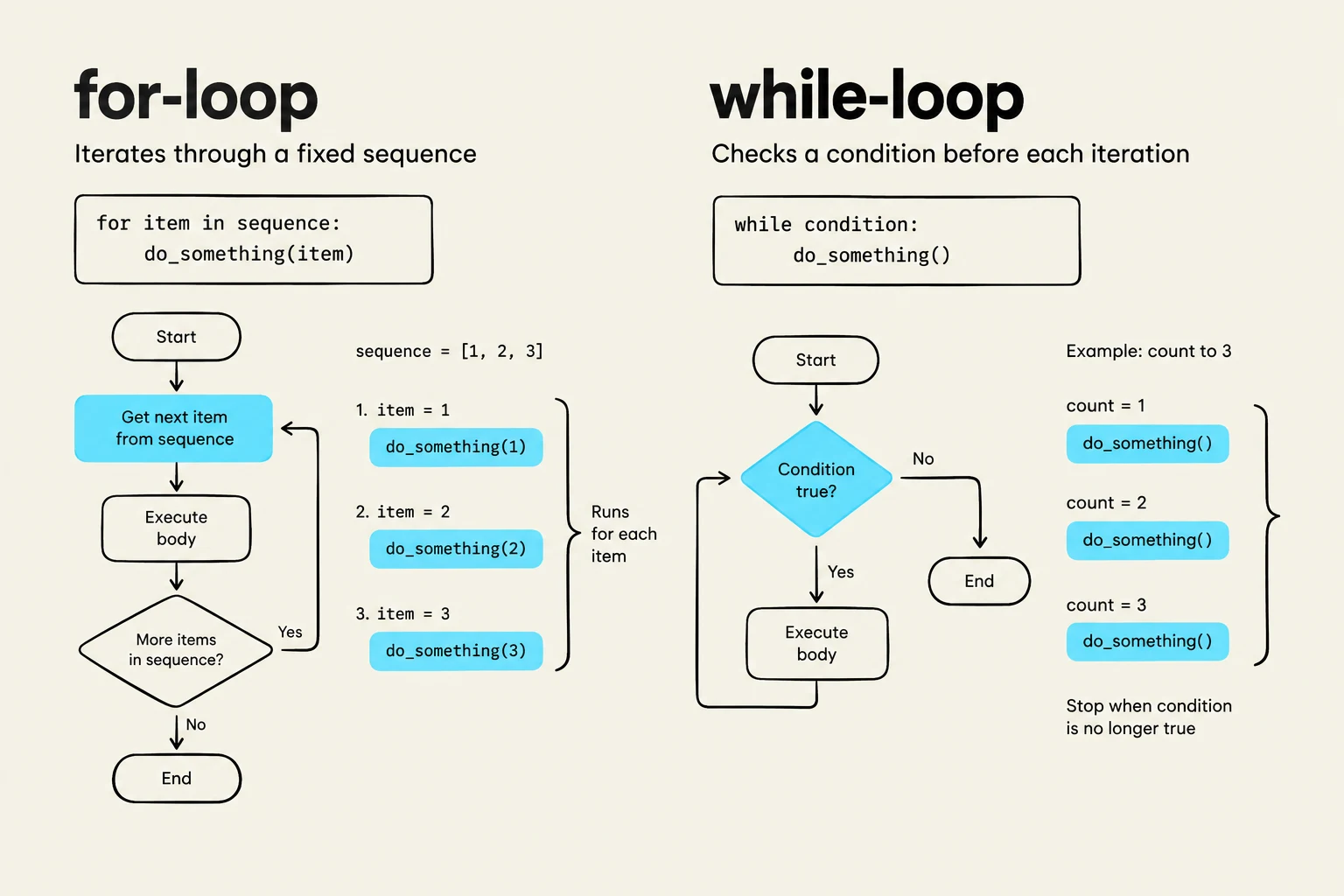
When you need to repeat a task, you use loops. There are two primary types in Python: for loops and while loops.
For-Loops (Definite Iteration)
A for loop is used to iterate over a sequence (like a string, a list, or a tuple). The loop picks each element out of the sequence one by one and assigns it to a loop variable.
To control exactly how many times a loop runs without manually typing a list, we use the range() function. The range(start, stop, step) function is highly flexible:
range(5) produces [0, 1, 2, 3, 4] (note that it stops before the stop value).
range(3, 7, 2) produces [3, 5].
While-Loops (Indefinite Iteration)
A while loop repeats a block of statements as long as a specific condition remains True.
This illustration compares and contrasts the concepts of for-loops and while-loops in programming, illustrating their syntax and flowcharts.
Breaking and Continuing
Sometimes you need to exit a loop prematurely.
break: Immediately terminates the loop and jumps to the code following the loop.
continue: Skips the remaining statements in the current iteration and jumps back to the top of the loop to check the condition again.
Modules and the main Function
As your programs grow, you will want to organize code into multiple files. In Python, a file containing code is called a module. You can use a module in another file using the import command.
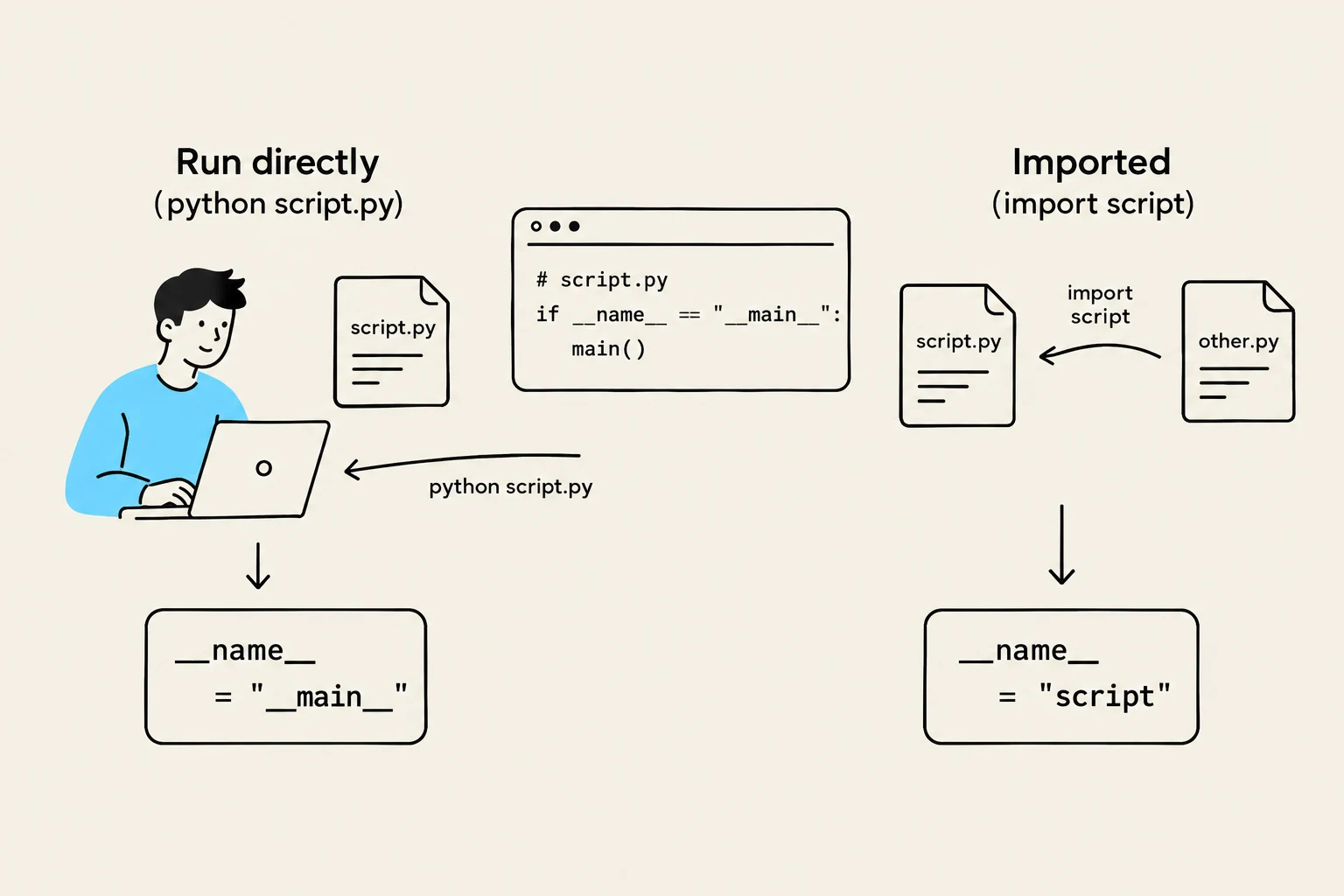
To make a script professional and usable both as a standalone program and as an imported module, you should use the if __name__ == "__main__": construct.
The __name__ Attribute
Every Python module has a special attribute called __name__:
If you run the file directly, __name__ is set to '__main__'.
If you import the file as a module, __name__ is set to the actual name of the file.
By placing your primary execution logic inside a main() function and calling it only within that if __name__ == "__main__": block, you ensure that the code doesn't accidentally run when someone simply wants to import your functions.
This diagram illustrates the difference between running a Python script directly and importing it as a module, showing how the '__name__' variable is set differently in each case.
Handling Exceptions
Even perfect logic can fail due to unexpected user input or external factors (like dividing by zero). These are called runtime errors or exceptions.
You can prevent your program from crashing by using a try...except block:
The code in the try block is executed first.
If an error occurs, Python stops the try block and looks for an except block that matches the error type.
If a match is found, the except block runs, allowing the program to continue gracefully.
If you aren't sure which specific error might occur, you can use a "bare" except: block to catch any exception, though it is generally better practice to name the specific error you expect.
Keep reading for free.
Create an account to finish this reading and make it part of your study routine.