Learn how the try-with-resources statement in Java simplifies resource management, ensuring automatic closure of resources like file handles and database connections, thereby preventing memory leaks and improving code robustness. This guide covers its evolution from traditional try-catch-finally blocks, requirements fo
In software development, managing external resources—such as file handles, database connections, or network sockets—is a critical task. If these resources are not properly closed after use, they can lead to memory leaks, file locking issues, and system instability. Historically, Java developers relied on manual cleanup logic, but since the introduction of Java 7, the try-with-resources statement has provided a much more robust and elegant way to handle resource management.
The Evolution of Resource Management
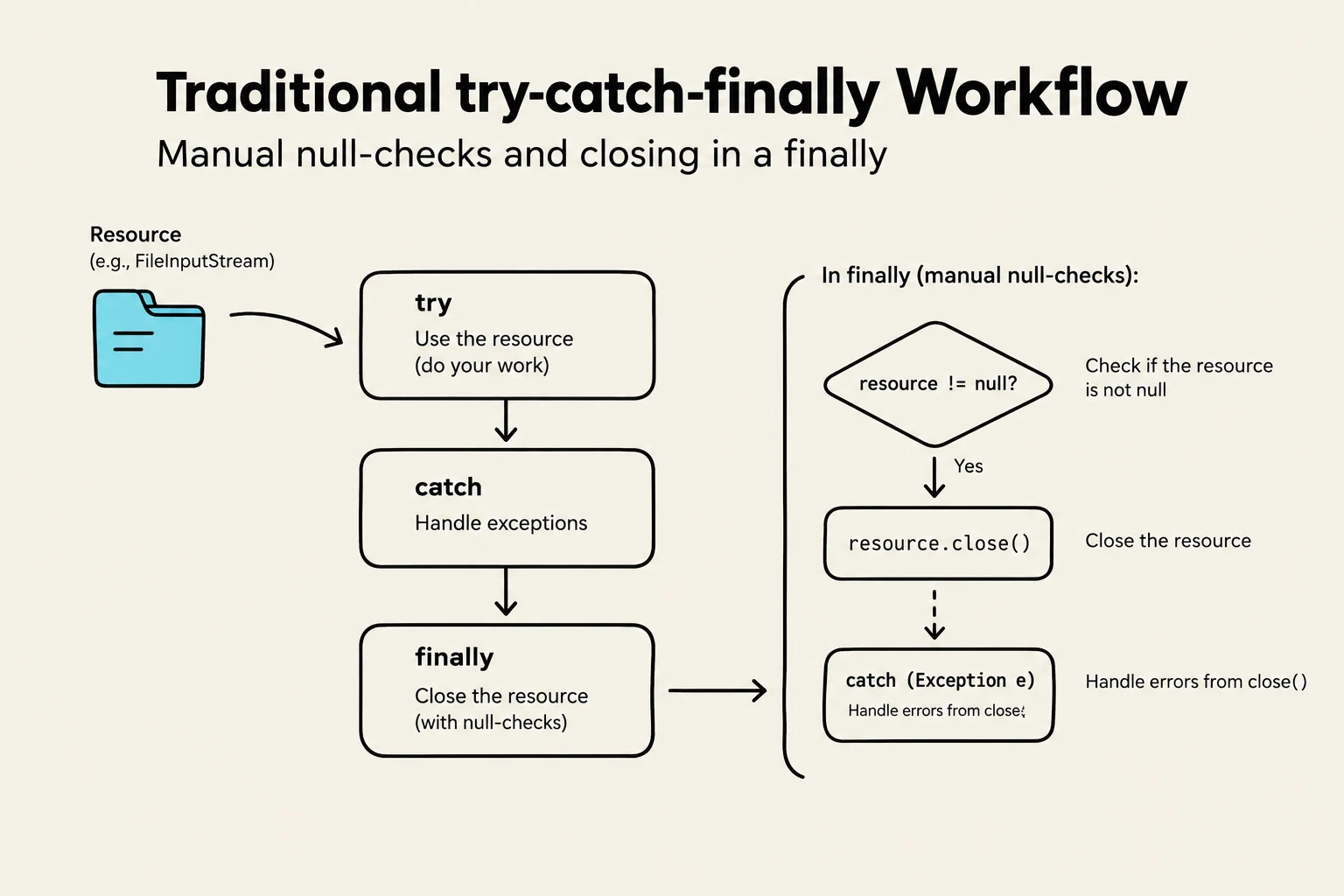
Before the advent of try-with-resources, the standard way to ensure a resource was closed was by using the traditional try-catch-finally block. In this pattern, you would declare the resource outside the try block, initialize it inside, and then perform the cleanup in a finally block to guarantee execution regardless of whether an exception occurred.
While functional, this approach is verbose and error-prone. Developers often forget to check if the resource is null before calling .close(), or they may encounter an exception within the finally block itself, which can mask the original exception thrown in the try block.
A flowchart illustrating the traditional try-catch-finally workflow in programming, detailing manual null-checks and resource closing within the finally block.
The Old Way: Manual Cleanup
Consider the following example of reading a text file using the traditional method:
Scanner scanner = null;
try {
    scanner = new Scanner(new File("test.txt"));
    while (scanner.hasNext()) {
        System.out.println(scanner.nextLine());
    }
} catch (FileNotFoundException e) {
    e.printStackTrace();
} finally {
    // Manual resource management is verbose and requires null checks
    if (scanner != null) {
        scanner.close();
    }
}
Understanding Try-With-Resources
The try-with-resources statement simplifies this process by allowing you to declare resources directly within the try statement itself. The primary advantage is the "assurance" that any resource declared in this manner will be automatically closed once the execution of the try block completes, whether it finishes successfully or throws an exception.
To achieve this automatic closing, the resource must be both declared and initialized inside the parentheses of the try statement.
The New Way: Automatic Cleanup
Here is the same file-reading logic rewritten using try-with-resources:
try (Scanner scanner = new Scanner(new File("test.txt"))) {
    while (scanner.hasNext()) {
        System.out.println(scanner.nextLine());
    }
} catch (FileNotFoundException e) {
    e.printStackTrace();
}
Notice how much cleaner the code is. There is no need for a finally block to close the Scanner, as Java handles it for you.
This diagram illustrates the lifecycle of a resource managed within a try-with-resources statement in programming, showing its initialization, usage within a try block, and automatic closure.
Requirements for Resources: AutoCloseable and Closeable
Not every Java object can be used in a try-with-resources statement. For a class to be "auto-closable," it must implement specific interfaces that define a close() method.
AutoCloseable Interface: This is the parent interface introduced in Java 7. Any class implementing this interface can be used in a try-with-resources block.
Closeable Interface: This is a sub-interface of AutoCloseable. It is primarily used for classes that deal with I/O streams.
When you use a resource in a try-with-resources block, the JVM implicitly calls the .close() method of that object at the end of the block.
Exam Tip: If you are asked which interface is required for a custom class to be used in a try-with-resources statement, remember that AutoCloseable is the fundamental requirement, while Closeable is specifically for I/O operations.
Advanced Usage and Rules
Try-with-resources is quite flexible and follows several important rules that help manage complex resource scenarios:
Multiple Resources
You are not limited to a single resource. You can declare and initialize multiple resources by separating them with a semicolon within the try parentheses.
Order of Closing
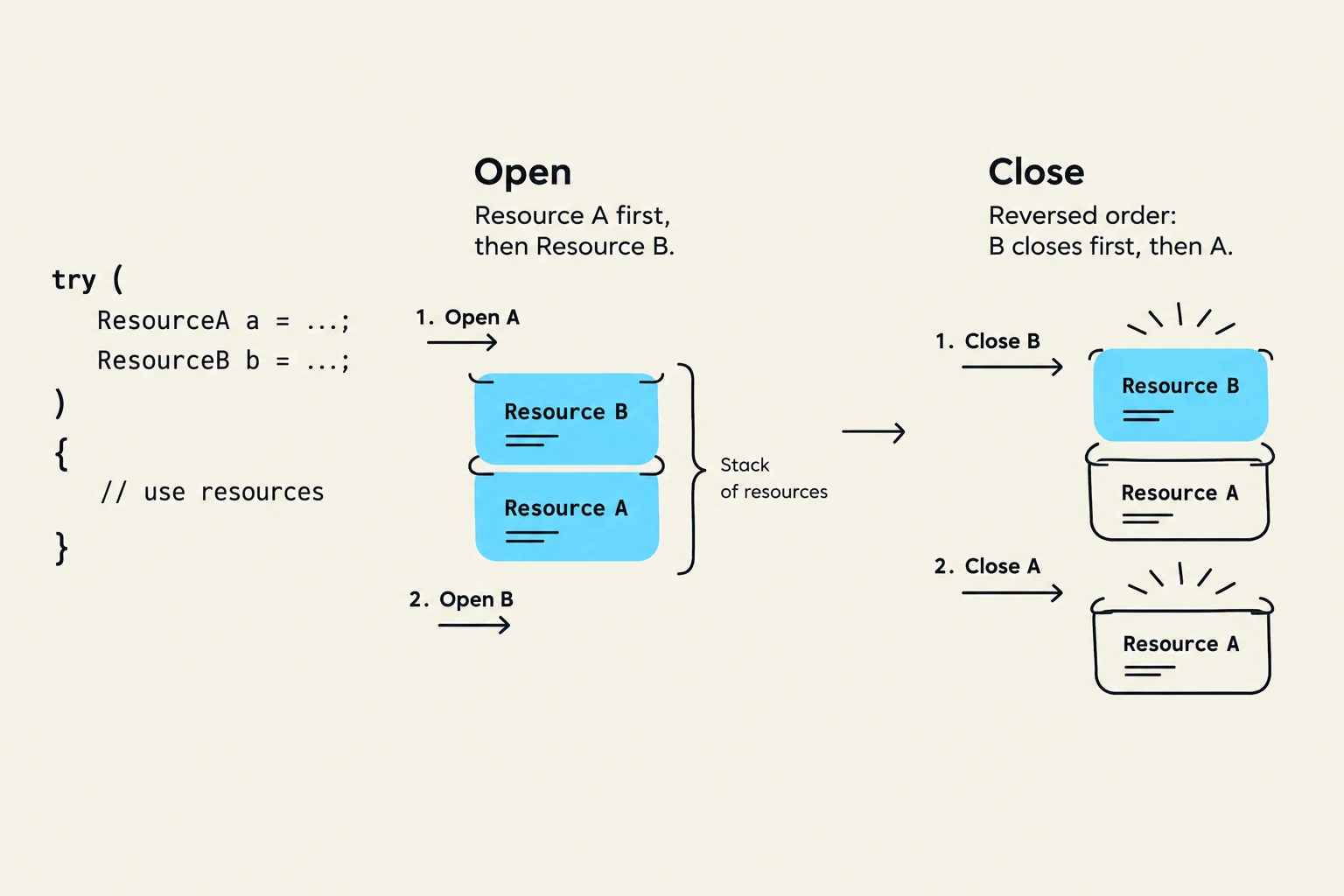
When multiple resources are declared, they are closed in the reverse order of their creation. This means the resource that was defined/acquired first will be the last one to be closed. This is crucial because later resources often depend on earlier ones (for example, a BufferedReader wrapping a FileReader).
Combining with Catch and Finally
A try-with-resources block does not replace the need for error handling. You can still include catch blocks to handle specific exceptions and finally blocks if you have additional non-resource cleanup tasks to perform.
This diagram illustrates the concept of resource management in programming, specifically how resources opened in a certain order are closed in the reverse order, often referred to as the LIFO (Last-In, First-Out) principle, similar to a stack.
Summary Table
Feature
Traditional try-catch-finally
try-with-resources
Resource Closing
Manual (in finally block)
Automatic
Code Verbosity
High (requires null checks)
Low (cleaner syntax)
Error Proneness
High (easy to forget .close())
Low (handled by JVM)
Requirement
None
Must implement AutoCloseable
By adopting the try-with-resources statement, you ensure that your Java applications are more robust, readable, and free from the common pitfalls of manual resource management.
Keep reading for free.
Create an account to finish this reading and make it part of your study routine.