Introduction to Jupyter Notebooks and Least Squares Fitting
Learn how to use Jupyter Notebooks for computational science and engineering, and apply the method of least squares to fit experimental data to a physical model.
In modern computational science and engineering, the ability to combine executable code, mathematical equations, and explanatory text in a single document is invaluable. This article introduces you to the Jupyter Notebook environment—a standard tool in the Python ecosystem—and demonstrates how to apply the mathematical method of least squares to fit a physical model to experimental data.
Getting Started with Jupyter
To begin working with computational models, you first need a robust environment. While there are many ways to install Python, the Anaconda Distribution is a highly recommended method for students and researchers. Anaconda provides a comprehensive suite of packages and includes the Anaconda Navigator, a graphical interface that allows you to launch applications like Jupyter Notebook with a single click.
Once launched, Jupyter Notebook opens in your web browser, providing an interactive interface where you can write code, view outputs, and document your thought process simultaneously.
This illustration shows the steps to download, install, and launch the Jupyter Notebook using Anaconda Distribution.
The Building Blocks: Cells, Kernels, and Markdown
A Jupyter Notebook is not a single monolithic file, but rather a collection of interconnected components:
Cells: The fundamental unit of a notebook. A notebook is composed of multiple "cells" that can be executed individually. There are two primary types:
Code Cells: These contain executable Python code. When run, the output (such as a plot or a calculation) appears directly below the cell.
Markdown Cells: These are used for documentation. They allow you to use rich text formatting, headers, and mathematical notation to explain your work.
The Kernel: This is the "engine" running behind the scenes. The kernel is the computational process that executes the code contained in your cells.
Exam Tip: Managing the Kernel
If your code enters an infinite loop or if you encounter a strange error that doesn't seem to make sense, you may need to Restart the Kernel. This clears all variables from the computer's memory and starts the computational engine from a fresh state.
Markdown for Documentation
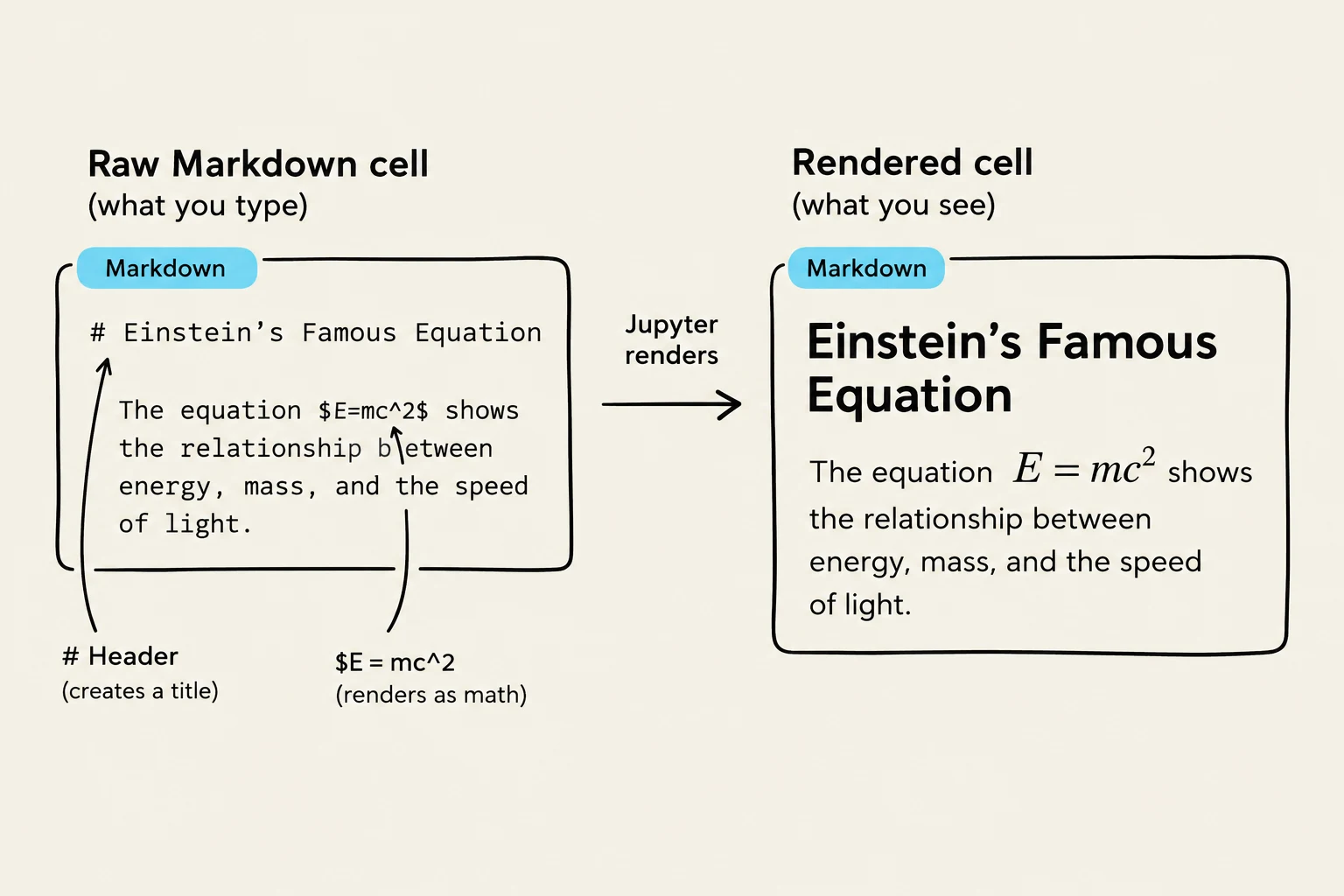
Markdown is a lightweight markup language that makes it easy to write formatted text using a plain-text editor. In a scientific context, Markdown is essential because it allows you to integrate LaTeX equations directly into your notebook, making your reports look professional and easy to follow.
This image illustrates how Markdown code is rendered in a Jupyter notebook, specifically showing the creation of a title and the display of Einstein's famous equation, E=mc^2.
The Method of Least Squares
Once you are comfortable with the environment, you can apply mathematical optimization techniques. A common task is Least Squares Fitting, where we attempt to find the best parameters for a model given a set of data points $(x_i, y_i)$ for i=1,…,N.
Suppose we want to fit a two-parameter model that has no constant term:
y=ax+bx2
Defining the Objective Function
To find the "best" values for a and b, we must minimize the discrepancy between our model and the actual data. This discrepancy is measured by the Sum of Squared Residuals, denoted as S(a,b). A residual is the difference between the observed value yi and the value predicted by our model axi+bxi2.
The sum of these squared differences is expressed as:
S(a,b)=i=1∑N(yi−(axi+bxi2))2
Minimization via Calculus
To minimize S(a,b), we take the partial derivatives with respect to our parameters a and b and set them equal to zero:
Partial derivative with respect to a:
∂a∂S=∑i=1N2(yi−axi−bxi2)(−xi)=0
Partial derivative with respect to b:
∂b∂S=∑i=1N2(yi−axi−bxi2)(−xi2)=0
By simplifying these equations (dividing by −2 and distributing the summation), we transform the problem into a linear system of two equations:
a∑xi2+b∑xi3a∑xi3+b∑xi4=∑xiyi=∑xi2yi
Matrix Representation
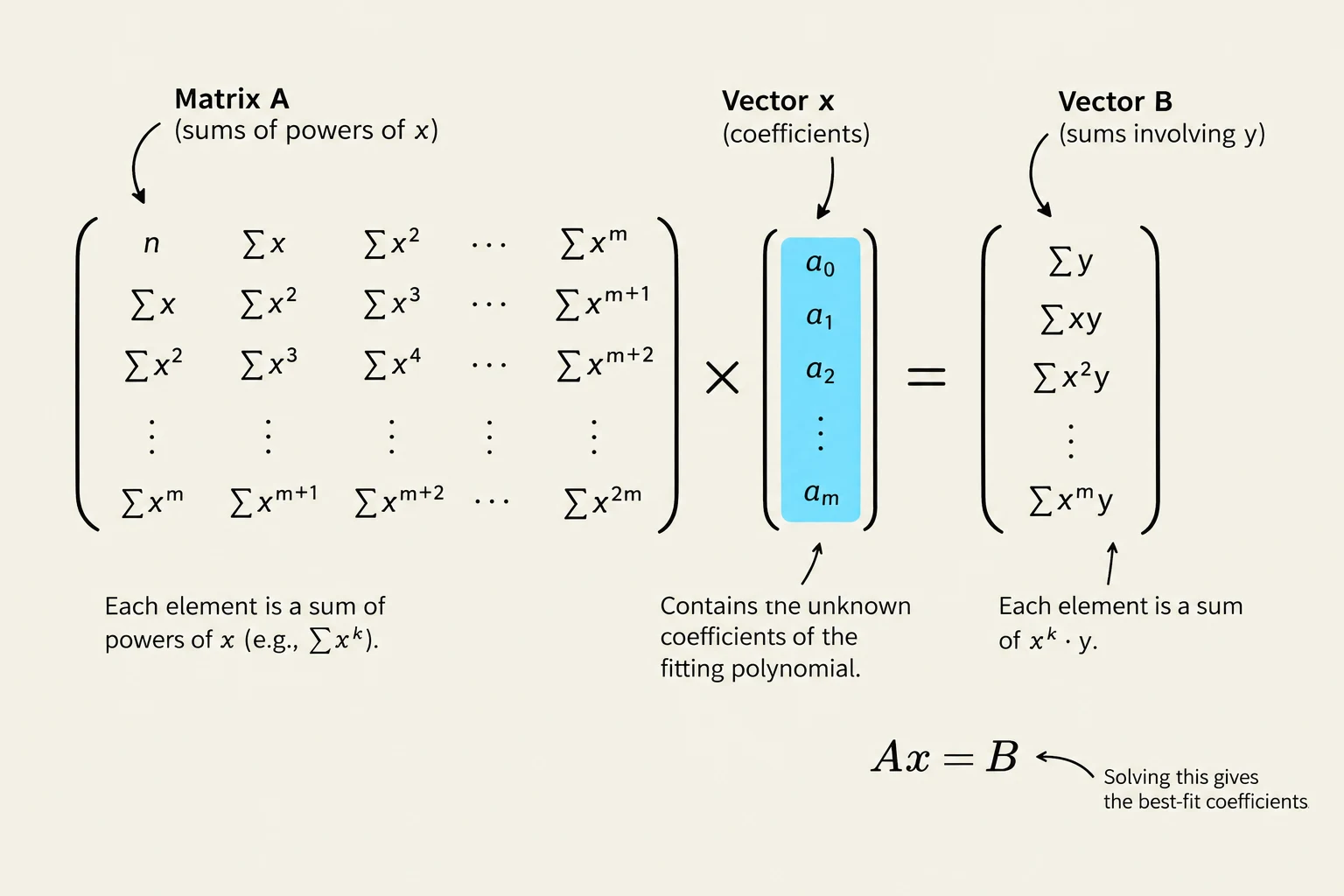
In computational programming, it is much more efficient to solve such systems using Matrix Form. We can rewrite the linear system above as:
[∑xi2∑xi3∑xi3∑xi4][ab]=[∑xiyi∑xi2yi]
This diagram illustrates the matrix equation Ax = B, commonly used in linear algebra and statistics for polynomial regression. Matrix A contains sums of powers of x, Vector x holds the unknown coefficients of the fitting polynomial, and Vector B consists of sums involving y. Solving this equation yields the best-fit coefficients.
By solving this matrix equation (using tools like numpy.linalg.solve in Python), you can find the optimal values for a and b that provide the best fit for your experimental data.
Note on Solvability
For a unique solution to exist, the matrix on the left-hand side must be non-singular (invertible). This generally requires that the data points xi are not all the same and provide enough variation to distinguish between the x and x2 terms.
Keep reading for free.
Create an account to finish this reading and make it part of your study routine.