HCI Guidelines, Principles, and Theories: A Hierarchical Approach to Design
This document explains the hierarchy of knowledge in Human-Computer Interaction (HCI), detailing low-level guidelines, mid-level principles, and high-level theories used to support design and evaluation.
In the field of Human-Computer Interaction (HCI), designing effective interfaces is not a matter of mere intuition or aesthetic preference. Instead, it is a disciplined practice supported by a hierarchy of knowledge. To build systems that are usable, efficient, and satisfying, designers rely on three distinct levels of abstraction: Guidelines, Principles, and Theories. While they are interconnected, they serve different purposes—ranging from specific "how-to" advice to high-level frameworks that predict human behavior.
The Hierarchy of Design Knowledge
Understanding the distinction between these three levels is fundamental to any HCI practitioner.
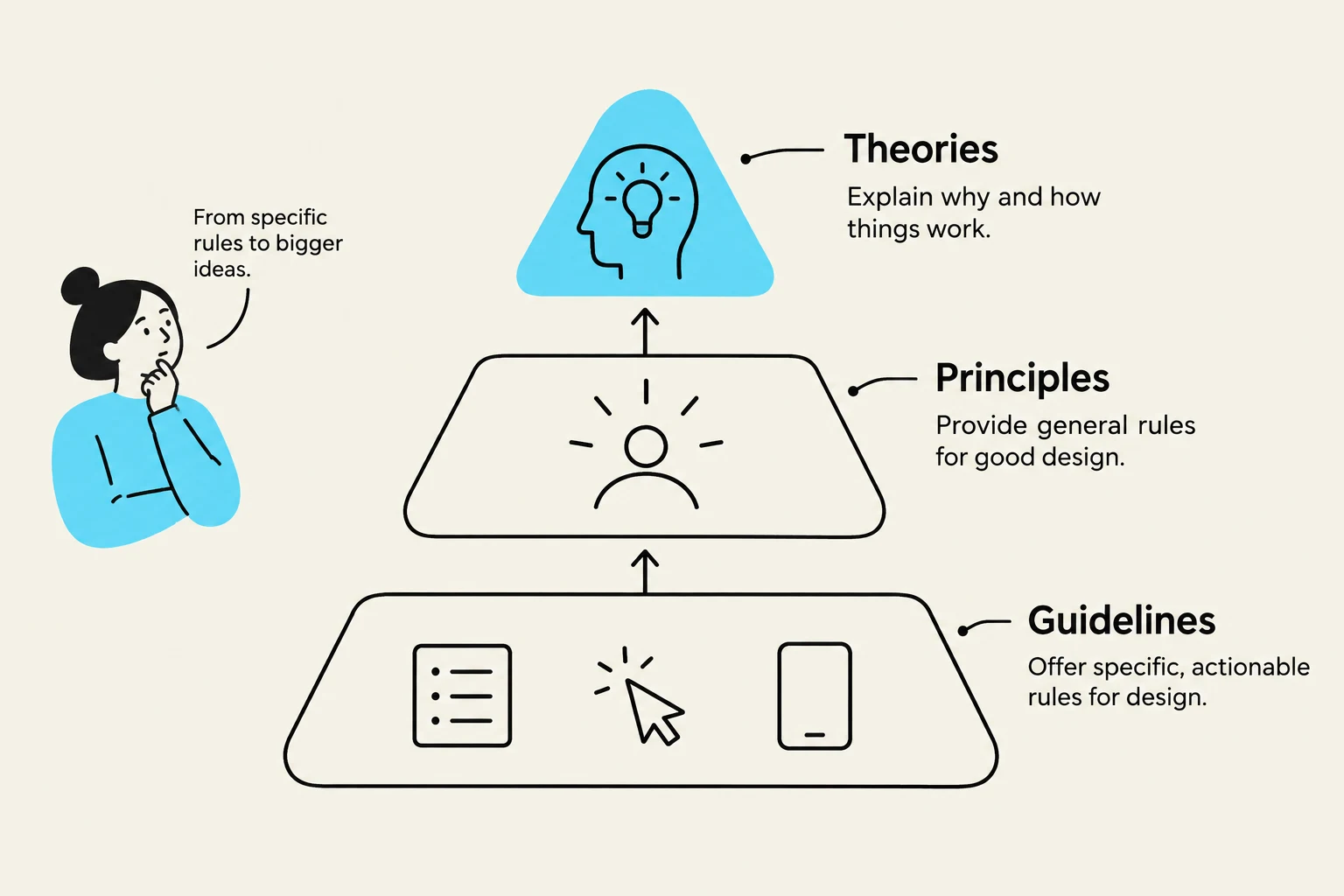
Guidelines (Low-level): These are specific, actionable pieces of advice regarding good practices and cautions against potential dangers. They are often based on best practices and help promote consistency in terminology, appearance, and action sequences among multiple designers.
Principles (Mid-level): These are more fundamental, widely applicable, and enduring than guidelines. Principles serve as strategies or rules used to analyze and compare different design alternatives.
Theories (High-level): These are broad frameworks used to support design, evaluation, communication, and teaching. Theories can be descriptive, explanatory, prescriptive, or even predictive (e.g., predicting how long it takes a user to point at a button).
This diagram illustrates the relationship between theories, principles, and guidelines in design, showing how specific rules can lead to broader ideas.
Low-Level Guidelines and Accessibility
Guidelines provide the "rules of thumb" that ensure a predictable user experience. For example, the National Cancer Institute provides specific guidelines such as standardizing task sequences, using descriptive headings, and ensuring that embedded links are clear.
Accessibility Guidelines
A critical subset of guidelines focuses on accessibility, ensuring that systems are usable by people with diverse abilities. Key requirements include:
Providing text equivalents for every non-text element.
Synchronizing equivalent alternatives for time-based multimedia.
Ensuring information conveyed by color is also available through other means (e.g., text or patterns).
Mobile HCI Design
Mobile environments introduce unique design constraints, such as smaller screen sizes, touch-based data entry (which can increase error rates), limited battery power, and varying data download speeds. Consequently, mobile guidelines emphasize:
Spatial consistency.
Minimizing the number of steps (taps) required to complete a task.
Focusing on high-level information to reduce cognitive load.
Mid-Level Principles: The Core of Usability
Principles guide the designer through the complex decision-making process. Before applying principles, a designer must "know thy user" by determining their skill levels—ranging from novices to expert frequent users. This is often paired with Task Analysis, which involves observing users to decompose high-level tasks into smaller, measurable steps.
The 8 Golden Rules of Interface Design
One of the most famous sets of principles is the 8 Golden Rules of Interface Design:
Strive for consistency.
Cater to universal usability.
Offer informative feedback.
Design dialogs to yield closure.
Prevent errors.
Permit easy reversal of actions.
Keep users in control.
Reduce short-term memory load.
Interaction Styles
Principles also dictate how a user communicates with a system through various interaction styles:
Direct Manipulation: Interacting with objects directly (e.g., dragging a file).
Menu Selection: Choosing from a list of options.
Form Fill-in: Entering data into specific fields.
Command Language: Using typed syntax.
Natural Language: Using human-like speech or text.
Exam Tip: When asked to distinguish between a guideline and a principle, remember that a guideline is a specific instruction (e.g., "Use a checkbox for binary choices"), whereas a principle is a broader rule (e.g., "Strive for consistency").
Error Prevention and Automation
A key principle is error prevention. This involves making error messages constructive and positive, "graying out" inappropriate actions to prevent mistakes before they happen, and using selection-based inputs rather than freestyle typing to reduce slips.
Designers must also balance automation and human control. While automation can handle routine, tedious tasks, the user should remain in control, especially in high-consequence environments like air traffic control. While "autonomous agents" can adapt to a user's needs, they can also be problematic if the system makes changes that the user cannot predict or reverse.
High-Level Theories: Explaining and Predicting Behavior
Theories provide the scientific foundation for HCI. They can be categorized by their purpose:
Explanatory Theories: These help us understand and describe why users behave in certain ways or how they perceive designs.
Predictive Theories: These allow designers to mathematically estimate execution times or error rates before a single line of code is written.
Models of Action and Cognition
Several theoretical models are essential for deep analysis:
1. Foley and van Dam’s Four-Level Model:
Conceptual: The user's mental model of the system.
Semantic: The meaning of the commands and outputs.
Syntactic: The rules for assembling commands.
Lexical: The precise physical mechanisms (device dependencies) used to input commands.
2. Norman’s Seven Stages of Action:
This model describes the cycle of human interaction:
Forming the goal → 2. Forming the intention → 3. Specifying the action → 4. Executing the action → 5. Perceiving the system state → 6. Interpreting the system state → 7. Evaluating the outcome.
This model introduces two critical concepts: the Gulf of Execution (the gap between what the user wants to do and how the system allows them to do it) and the Gulf of Evaluation (the gap between the system's response and the user's ability to understand it).
Contextual Theories: Micro vs. Macro
Finally, theories can be viewed through the lens of scale:
Micro-HCI Theories: Focus on measurable, laboratory-style performance, such as speed and error rates on specific tasks.
Macro-HCI Theories: Focus on the broader user experience over long periods in realistic, social, and dynamic contexts.
This diagram illustrates the concepts of Micro-HCI and Macro-HCI, explaining their respective focuses and components. Micro-HCI deals with user interface details like speed and errors in lab settings, while Macro-HCI considers broader aspects such as people, context, and real-world usage.
Keep reading for free.
Create an account to finish this reading and make it part of your study routine.